
| Price | Free |
|---|---|
| Category | Tools |
| Version | 0.306 |
| Developer | dingulhangul |
| Added | Aug 11th, 2010 |
| App Views | |
| Votes | 0 votes |
| Google Rating | |
| Ratings | 3306 |
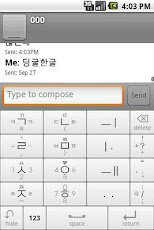
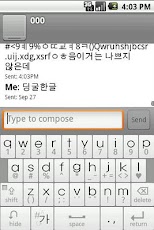
아래 설치방법을 꼭 읽어주세요.[특징]-직관적인 키 배치:빠른 적응-한손 혹은 양엄지 입력에 특화-멀티터치 지원-한글 암호 자동 영문 변환-큰 버튼사용: 오타 감소-창 전환없이 특문입력-쿼티포함[사용방법]버튼을 터치후 드레그해보세요. 숨김버튼 길게 누르시면 간단한 설명이 나옵니다.[설치방법]1)설정 ->언어 및 키보드->딩굴한글입력기 선택2)텍스트박스를 길게 누름->입력방법선택->딩굴한글입력기 선택스킨을 제작해주신 DINKI님께 진심으로 감사드립니다.[최근 업데이트]넥원 더블터치 오류 보정(옵션을 키셔야 사용가능)소소한 버그 수정Please read below how to install.[Feature]Intuitive key placement: rapid adaptation- One-handed thumb input or the amount on specific- Multi-touch support- Auto-English translation Hangul password- Large button use: typo reduced- Window switch input without teukmun- QWERTY includes[How to use]The touch of a button after dragging.Press and hold the button behind, followed by a brief description.[How to install]1) Settings -> Language & keyboard -> crazy Hangul Input Select2) the text box, press and hold -> Select Input Method -> crazy Hangul Input SelectSincerely thank you for making skins DINKI[Updated]Touch error correction nekwon doubleKey (option) should be usedMinor bug fixes
App Screenshots
Other Tools Apps





