

| Price | Free |
|---|---|
| Category | Books & Reference |
| Version | 3.7.1 |
| Developer | Jong Jin |
| Added | Apr 4th, 2012 |
| App Views | |
| Votes | 0 votes |
| Google Rating | |
| Ratings | 4448 |
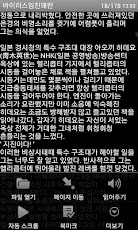
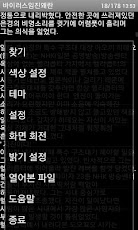
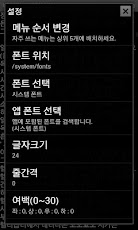
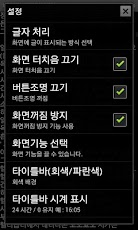
텍뷰는 텍스트 파일(.txt)로 된 무협지 또는 소설을 보기 위한 용도로 만들었습니다.광고 없이 간단한 기능만 필요하신 분들에게 적합합니다.[권한설명]- 오디오 설정 변경- 블루투스 기기와 페어링 => [읽어주기] 모노 블루투스 지원을 위해 필요- 휴대전화 상태 및 ID 읽기 => 읽어주기 중 전화올때 읽어주기 실행을 중지하기 위해 필요 (중지하지 않으면 읽어주기 소리와 통화 소리가 같이 들림)- USB 저장소의 콘텐츠를 수정/삭제 SD 카드의 콘텐츠를 수정/삭제 => [파일 열기]창에서 파일 삭제할 때 필요[주요특징]- 광고가 없습니다.- 절전기능으로 인한 화면 꺼짐을 방지합니다.- 파일 인코딩을 자동 판단합니다. (한글, UTF-8, UTF-16)- 화면에 많은 글을 표시하기 위해 원문을 살짝 조작합니다.(줄붙임 처리)- 읽어주기(TTS) 기능이 있습니다.(한국어TTS 설치 기기만 동작함)- 모노 블루투스헤드셋으로 읽어주기를 들을 수 있습니다.[설정 및 기능]- 화면밝기, 폰트(외부폰트가능), 글자크기, 줄간격, 글자색, 배경색(이미지) 설정- 페이지 이동, 찾기, 북마크, 자동 스크롤 기능- 전체화면 보기, 타이틀바 숨김, 상태(알림)표시줄 열기 기능- 마지막 보던 위치 기억- 비밀번호 잠금 기능자세한 기능 설명은 앱에서 메뉴 > 도움말을 참조하세요.[제약사항]- 용량이 큰 텍스트파일은 지원하지 않습니다.- 앱 실행 중 메모리 부족 에러로 앱이 종료될 수 있습니다. (갤럭시S2에서 2MB까지만 확인함. 그 이상은 보장 못합니다.)- 에러 없이 원활히 이용하시려면 파일을 최대 1MB이하로 줄이고 메모리정리도 가끔 해주세요.[릴리즈정보][v3.7.1]- [읽어주기] 오류로 재배포[v3.7.0]- [마지막 페이지 맞춤] 빈페이 추가 오류 수정- [페이지 하단 맞춤] 설정 추가 : 설정 > [화면기능 선택]- [자동 스크롤 설정]에 [픽셀] 추가 : 설정- [페이지 방식] 상(다음) / 하(이전) 추가 : 설정[v3.6.9]- 북마크 중복 생성 오류 수정[v3.6.8]- 갤럭시류 멀티윈도우 관련 개선- [빠른 페이징 사용] 추가 : 설정 > [화면기능 선택]- 북마크 자동 백업 기능 추가 : sd카드/tekview/bookmark- 여러 파일 삭제/이동 시 중지 오류 개선- 기타 오류 처리[v3.6.7]- [파일 열기 속도 개선] 추가 : 설정- [파일 날짜 표시] 추가 : 설정 > [화면기능 선택]- [파일 열기]창 볼륨키로 글자크기 조정- [자동 스크롤] "다시 묻지 않음" 추가 : 설정 > [자동 스크롤 설정]- [비밀번호 잠금 사용] 추가 : 설정- 외장SD, 내장SD 간 파일 이동 안되는 오류 수정[v3.6.6]- [파일 열기] 속도 개선 오류로 원복[v3.6.5]- [배경이미지] 설정 오류 수정- [파일 열기] 속도 개선[v3.6.4]- [자동 스크롤] 중 사용자 스크롤 가능- [색상 설정] 제목, 선택 색 추가- [읽어 주기] 언어 선택 추가[v3.6.3]- 밑줄 표시 예전 방식으로 변경- [페이지 이동] 개선(변경 시 바로 이동)- [자동 스크롤] 시간(초) 표시 추가- [배터리 잔량 표시] 기능 추가- [숨김파일 표시] 설정 추가[v3.6.2]- 처음 연 파일 마지막 페이지 이동 오류 수정- [빈 폴더 삭제]를 [폴더 삭제]로 변경- [파일 보내기] 메뉴 추가 : [파일 열기]창[v3.6.1]- [열어본 파일] 데이터 관련 오류로 재배포[태그]텍스트(Text), 뷰어(Viewer), 리더(Reader), 허니컴(android3.0), ICS(android4.0), 젤리빈(android4.1)Tekbyu a text (. Txt) file for viewing the muhyeopji or resulted in a novel.If you need a simple function without advertising, but is suitable forPermissions description]- Change your audio settings- Pairing with Bluetooth devices => [Speak] Mono Bluetooth support required for- Read phone state and ID => Incoming Calls-to-speech-to-speech needs to stop execution (If you do not stop and call-to-speech sounds such as the sound heard)- USB storage contents modify / delete SD card contents of the edit / delete => [Open] window, when you delete a file you need[Main Features]- No ads.- Due to the power-saving features to prevent the screen off.- To determine the file encoding automatically. (Hangul, UTF-8, UTF-16)- Many articles to display on the screen lightly to operate the original text. (Attachment line treatment)- Speech (TTS) feature (Korean TTS installed equipment only operates)- Mono Bluetooth headset you can hear the speech.[Settings and Features- Screen brightness, font (external fonts available), font size, line spacing, font color, background color (image) set- Go to page, search, bookmarks, auto-scroll feature- Full-screen view, hide the title bar, status (notification) bar open function- Last watched position memory- PIN code lock functionDetailed Description of the app menu> Please refer to Help.[Constraints]- Large text files is not supported.- App to App running out of memory errors may be terminated. (Up to 2MB in the Galaxy S2 only; beyond the warranty does.)- To use smoothly without errors, the file up to 1MB or less, sometimes reducing the memory cleaning back[Release Information][V3.7.1]- [Speech] Error redistributed[V3.7.0]- [Last Page Fit additional error correction blank page- Fit the bottom of the page] Add setting: Settings> Display Function Select- Auto-scroll setting] in [pixels] Added: Set- [Page type] on the (next) / Down (Previous) Add: set[V3.6.9]-Bookmark duplicate error correction[V3.6.8]- Galaxy current multi-window-related improvements- Quick Paging] added: Settings> [Display Function Select- Bookmark add automatic backup feature: sd card / tekview / bookmark- Delete multiple files / stop error improve when moving- Other Error Handling[V3.6.7]- To speed up the File Open] add: set- [File Date Display added: Settings> [Display Function Select- Open File window, adjust the font size with the volume key- Auto scroll] "Do not ask me again" Added: Settings> Auto Scroll Settings- Use password lock] Add: Set- External SD, error correction should not move files between internal SD[V3.6.6]- [Open] to improve the speed error, recover the[V3.6.5]- Background image setting error correction- Open File Faster[V3.6.4]- Auto scroll] Scroll of possible users- Color Settings title, choose colors added- [Speech] Add language selection[V3.6.3]- Underline the past to change the way[Go to page] Improvement (jump change)- Auto scroll] Time (seconds) display additional- Displaying the remaining battery charge feature added- Show hidden files setting additional[V3.6.2]- Move the last page of the first file open error correction- Empty Folder Delete] [Delete Folder changed to- Send a File] menu additions: Open File window[V3.6.1]- [Opened Files redistribute the data-related errors[Tags]Text (Text), Viewer (Viewer), Reader (Reader), Honeycomb (android3.0), ICS (android4.0), Jelly Bean (android4.1)
App Screenshots
Other Books & Reference Apps


