
| Price | Free |
|---|---|
| Category | Tools |
| Version | 1.0 |
| Developer | guojia |
| Added | Sep 25th, 2011 |
| App Views | |
| Votes | 0 votes |
| Google Rating | |
| Ratings | 6 |
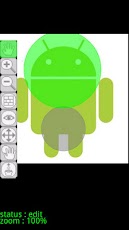
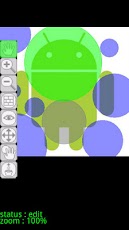
[Outline] It is a tool from which the read picture is clipped circularly. It becomes a wonderful way of being visible by the interpolation function of man’s brain. A thing not to see is restricted for hiding. (^^)* An advertisement is displayed on this tool. * An advertisement can be erased for 3 minutes with the button under an advertisement. * If there are an opinion and a demand, please inform me. [Object android version] 2.2 or more Android(s) I am performing the check of operation by "REGZA Phone T-01C" and Android 2.2. [Function] * The MENU button – SET : The place I want you to clip, and hidden room are set up.- AUTO SET : Arrange a clipping part automatically. — It is random, and since it arranges, it is effective if it performs several times. – GENERATE : Clipping processing of a picture is carried out to compensate for a drawing setup. – Choose Color : The color of a background and the part which is not clipped is set up. — A background color is chosen from black, white, and a color picker dialog. — The color selection dialog can detaermine a color, if a central circle is pushed. – CLEAN : All the circles specified by drawing setup are deleted. — The load image does not cancel. – LOAD : The dialog which chooses a picture from SD card is displayed. — A file is chosen from the displayed list dialog. – SAVE : Save the image created by picture generation.– By the file name which added the date to the former image, it is saved to a directory. – END : end a AndroCircleCutoutScreen menu (from top) * Screen menu (from a top) 1. Screen Movement (Hand) : Move the Whole Picture. 2. Magnifying Glass (+) : Expand Picture (500% of Maximum). 3. Magnifying Glass (-) : Reduce Picture (10% of Minimum). 4. Concealment Circle (Block) : Arrange Concealment Circle in Touched Part. 5. Display Circle (Eyes) : Arrange Display Circle in Touched Part. 6. Circle Resizing (Arrow) : Change Size of Circle Which is Touching. 7. Circle Movement (Circle and Hand) : Move Circle Which is Touching. 8. Circle Deletion (Garbage Can) : Delete Circle Which Touched. — The operation relation of a circle is aimed at the less than 30-pixel nearest circle from the touched part. [Use rights limit]Authority is acquired in order to use the following functions. A file write-in function: Access to SD card Advertising display: A communication function, a position acquisition function
App Screenshots

Other Tools Apps





