| Price | Free |
|---|---|
| Category | Photography |
| Version | 1.2 |
| Developer | FM.Bee Corp. |
| Added | May 27th, 2011 |
| App Views | |
| Votes | 0 votes |
| Google Rating | |
| Ratings | 640 |
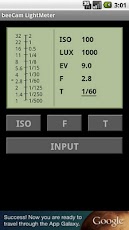
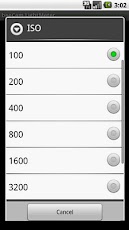
beeCam Light Meter is a incident-light meter application.This app can measure the exposure without influence of the reflectivity of subject.The accuracy of measurements depends on the sensor of your phone.^^^^^^^^^^^^^^^^^^^^^^^^^^^^^^^^^^^^^^^^^^^^^^^^^^^^^^^^^^^^^^^^^^This app can also calculate f-stop or shutter speed by using manually inputted illuminance or EV.The following model is a model that CAN retrieve the value of illuminance sensor confirmed by the user’s review.————————————————————Nexus S, Nexus One, REGZA Phone IS04, HTC EVO,HTC WILDFIRE, Motorola Droid 2 Global, Motorola DEFY, DROID X, DROID BIONIC,Samsung Galaxy S2(SC-02C), Samsung Galaxy_Tab(SC-01C), LYNX 3D SH-03C, Dell Streak, Garmin A50, DELL Streak SoftBank 001DL, MEDIAS N-04C,SHARP IS03, AQUOS PHONE SH-12C, AQUOS PHONE IS11SH, iida INFOBAR A01,G’zOne(IS11CA),Acer Liquid Metal, REGZA Phone T-01C————————————————————The following model is a model that CAN NOT retrieve the value of illuminance sensor confirmed by the user’s review.————————————————————HTC Legend, HTC Desire, HTC EVO 3D, HTC hero,Samsung Galaxy S, Samsung Galaxy S2(?), Samsung Galaxy Ace, T-Mobile G2x, Motorola Milestone, Motorola Milestone2, Motorola CLIQ, Motorola ATRIX(Gingerbread Version), Motorola DROID X(?), DROID 2(?), Xperia acro, Xperia Arc, Xperia SO-01B, S51SE, myTouch slide, Optimuschat L-04C,Sony Ericsson ST18i, SHARP IS01, LG P500, LG Optimus Dual————————————————————Please see instructions here! http://www.fmbee.com/products/beecamlightmeter_en.htmlMeasurement procedure(1) The application program is started. (2) From the screen, tap the "START" button.(3) Smartphone put in front of the subject. (Please toward for the camera side where the illuminance sensor is used to take a picture. )(4) Tap the "STOP" button.(5) When the ISO sensitivity is set, tap the "ISO" button . The ISO setting screen is displayed. Please select the ISO sensitivity. (6) [For aperture priority] To calculate the shutter speed, tap the "F" button. A set screen of F value is displayed. Please select F value. [For shutter speed priority] To calculate F value, the "T" button is pushed. A set screen of the shutter speed is displayed. Please select the shutter speed. (7) From the screen, get The ISO, F value and the shutter speed, and set in the camera.Remarks・The illuminance sensor is installed on the liquid crystal screen side of the terminal. ・In the terminal that cannot use the illuminance sensor, the "INPUT" button is displayed instead of the "START" button. Tap the "INPUT" button, the illuminance setting screen is displayed. Please specify the illuminance corresponding to the situation. The ISO, F value and the shutter speed are calculated by the specified illuminance. ・When click the menu key to the termina, the menu is displayed under the screen. In "Setting" menu, it is possible to set it as follows. Select light values: Select useing sensor or manual input. Sensor correction: Input the correction value of the illuminance sensor. Steps: Select same the steps as the camera used to take a picture. ・The light sensor may not get the terminal does not change the brightness and intensity. In that case, please read after covering with the hand and darkening the sensor once and apply light. ・The light sensors may take some time to get light.
App Screenshots
Other Photography Apps