
| Price | $1.72 |
|---|---|
| Category | Personalization |
| Version | 2.2 |
| Developer | BRIONICthemes |
| Added | Dec 7th, 2011 |
| App Views | |
| Votes | 0 votes |
| Google Rating | |
| Ratings | 19 |
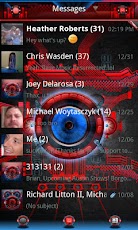
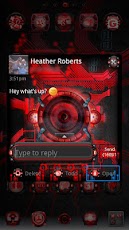
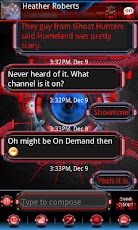
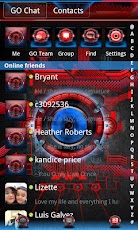
Ultimate EYE-Phone Bionic PRO GOSMSTheme is a brand new premium theme for GO SMS and GO SMS Pro. This is the PRO (ad-free) version!Ultra polished and clean, this truly awesome GO SMS Pro theme features the iconic DROID Bionic style eye, completely redesigned 100% from scratch in a brand new ultimate style, with new stunning backgrounds and amazing effects.BIONIC EYE-PHONE GO SMS PRO THEMES FEATURES:+ Main background features an exclusive blue Ultimate BIONIC style eye, completely redesigned from scratch with an exclusive newly designed Bionic style background.+ Supports newest versions of GOSMS PRO including new Application Center icons and GO Chat/Contacts.+ Message list features custom designed Bionic EYE shaped message boxes.+ Custom designed SMS pop-up with an Ultimate Bionic style, custom text colors, and Bionic style ‘EYE-cons’.+ Textfields are also designed as the Bionic style eye, with various glowing effects when pressed and active.+ Icon backgrounds feature a digital design which glows red when pressed.+ All icons support the latest GO SMS Pro Theme versions.+ Custom themed conversation list with custom designed Ultimate BIONIC EYE for pictureless contacts and group messages.+ Ultimate Bionic style top bar, bottom bar, and mainscreen tab bar, featuring a Bionic style hovering icon effect.+ Designed to match the Ultimate EYE-Phone GO Launcher EX premium theme and free clock widgets (also available in the Android Market).DIRECTIONS & INSTRUCTIONS:This is a theme (like a skin) for GO SMS Pro, it will not open on its own. You must install the free SMS / messaging app "GO SMS Pro" and apply it.To apply theme:Open GO SMS Pro > press Menu > Themes > Ultimate Bionic PRO Theme > ApplyTo customize any font or font color:Press Menu > Settings > Advanced tab > Appearance Settings > Choose Conversation List customization // Conversation customization (Message view) // Popup Window customization > Find and change whichever options to your liking.To show bottom bar with custom icons:Press Menu > Settings > Advanced tab > Appearance Settings > Switch Method > Both aboveTo add screen switching effects:Press Menu > Settings > Advanced tab > Appearance Settings > Transition effectDEVELOPER NOTES:Please e-mail if you have any other suggestions, questions, or concerns.
App Screenshots
Other Personalization Apps


