

| Price | $4.99 |
|---|---|
| Category | Tools |
| Version | 1.1.4 |
| Developer | Collectorz.com |
| Added | Dec 6th, 2010 |
| App Views | |
| Votes | 0 votes |
| Google Rating | |
| Ratings | 26 |
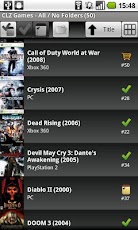
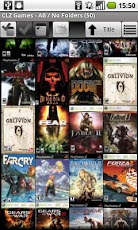
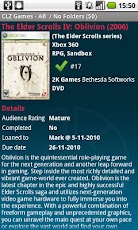
=================================IMPORTANT: CLZ Games is NOT a stand-alone app!This is an add-on for Game Collector for Windows.(available for $29.95 here: http://www.collectorz.com/game/ )You need Game Collector to catalog your game collection and EXPORT data and images to this CLZ Games for Android.** Without Game Collector, this app is useless! **=================================Are you using Collectorz.com’s Game Collector to catalog your video game collection?Then CLZ Games is a great companion, to browse, sort andsearch your game collection (and your wish list!) on your Android device.Just use the Export to CLZ Games feature in Game Collector toexport your existing database (including images) to this Android app.Features:* Import your collection data and images from the Windows edition – Use Wi-Fi to transfer directly from Windows to your iPhone. – Or: Export to a file in the Win/Mac version, then copy the file to your Android’s SD card.* Browse your In Collection items, your Wish List, or your entire database, using the 3 main tabs on the top left: All, Collection, Wish List* View your game lists in 2 different views: – List : showing a small cover, title, platform, year, index nr and status. – Thumbnail Wall: just cover image thumbnails, but lots of em.* Sort your game lists by Title, Platform, Year, Index, asc. or desc.* Search your database by Title or Barcode* Group your items into folders. Choose from: Platform, Genre, Year, Developer, Publisher, Rating, Series and more…* Tap a game in any view to go to the Game Details page: – Cover, Title, Platform, Developer, Publisher, Description and personal info. – Use the Prev/Next go the previous or next game, or just swipe. – Choose from 4 styles: Blue, Black, Red, White* Tap small cover image on Details Page to go the Large Cover Page: – Use the Prev/Next go the previous or next game, or just swipe. – Shake iPhone to go to a random game in your current list. – Tap the image to return to Details Page.* Supports Portrait and Landscape modes in all views and pages.REQUIREMENTS:- Game Collector 3.5 for Windows or later. RECOMMENDED (needed to transfer data over Wi-Fi):- Wi-Fi connection to the same local network that your desktop computer is in.- Apple Bonjour service.
App Screenshots

Other Tools Apps





