
| Price | $1.66 |
|---|---|
| Category | Personalization |
| Version | 1.4 |
| Developer | BRIONICthemes |
| Added | Apr 2nd, 2012 |
| App Views | |
| Votes | 0 votes |
| Google Rating | |
| Ratings | 34 |
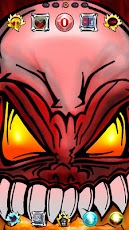
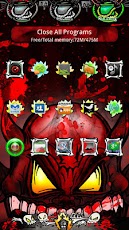
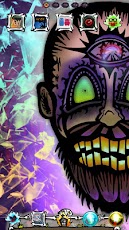
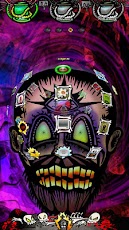
The DEMONS of GO Launcher Theme is a brand new paid-only hand-drawn / tattoo style theme for GO Launcher EX.The DEMONS of GO LAUNCHER theme features hand-designed graphics and icons with bold hand-drawn tattoo and bright comic book enhanced styles.DEMONS OF GO LAUNCHER THEME FEATURES+ Includes 6 hand-drawn and digitally enhanced high definition DEMON and MONSTER wallpapers. + Exclusive Wallpaper set includes the Demonic Surgeon, Blood Devil, Canibal Witchdoctor, Awakening Vampire, Paranormal Magician, and Shadow Demon. More to be added soon.+ Includes a wallpaper picker app for quick and easy wallpaper switches.+ Over 30 hand-designed icons, all other icons are themed with bone graves, hell fire, and spiritual soul orbs. All default icons include 8 different blood splatter effects.+ Totally redesigned DEMONS of GO LAUNCHER App Drawer, featuring a monster labratory tab bar with glowing ooze and a graveyard home background. + Includes 6 wallpaper-matching App Drawer backgrounds, which are all ‘INSANITY ENHANCED’ with even crazier designs and effects.+ Four custom designed dock bars, featuring a mass grave, flames, coffins, and ancient graveyard.+ Custom screen indicator features an opening stitched eye.+ Eight custom font styles included in theme.DIRECTIONS & INSTRUCTIONSThis is a theme (like a skin) for GO Launcher EX, it will not open on its own. You must install the free home screen app "GO Launcher EX" and apply it.To apply theme:Menu > Themes > DEMONS of GO LAUNCHER Theme > ApplyTo change Wallpaper:Press Menu > Wallpaper > DEMON Wallpapers!To change Dock Bar:Press Menu > Pref > Visual settings > Backgrounds > Dock background > GO Theme backgroundTo change App Drawer background:Press Menu > Pref > Visual settings > Backgrounds > App drawer background > GO Theme backgroundTo create icon effects (as seen in screenshots):First, set the scrolling to either horizontal or vertical (this changes which effects are available):Press Menu > Pref > App Drawer settings > Scrolling orientation > Horizontal/VerticalThen, choose an icon effect:Press Menu > Pref > Effects settings > Horizontal scroll effect or Vertical scroll effectTo hide/show the status bar with a swipe:Press Menu > Pref > Operation Settings > Glide up/down action > Show/Hide status barTo change fonts:Press Menu > Pref > Visual Settings > Fonts > Scan font > Select FontDEVELOPER NOTES:Please e-mail if you have any other suggestions, questions, or concerns.
App Screenshots
Other Personalization Apps


