

| Price | Free |
|---|---|
| Category | Tools |
| Version | 1.030 |
| Developer | David Zachariah |
| Added | Jun 11th, 2011 |
| App Views | |
| Votes | 0 votes |
| Google Rating | |
| Ratings | 23 |
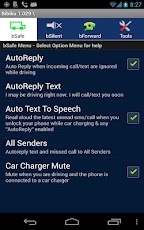
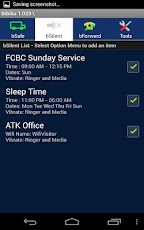
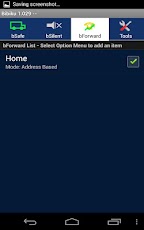
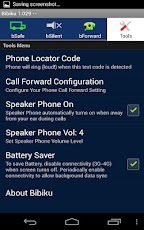
Driving App Summary:1. Auto Reply – AutoReplies, AutoMutes, and provides shortcuts to Voice Text or Call when driving.2. Auto Silent – Silents your phone and/or autoreplies (Timer or Wifi Connectivity based).3. Auto Call Forward – Forwards calls to your landline/your secretary (GPS or Wifi Connectivity based).4. Battery Saver – Minimizes 3G/4G power when screen turns off5. Phone Locator – Simply SMS a special text code to your phone, Bibiku will ring so that you can locate it.6. Auto Speaker Phone – Speaker phone turns on during calls, and automatically turns off when you hold up the phone to your ear.7. User friendly and very easy to use. See details below!!———————————————————–There are three main features in Bibiku: bSafe, bSilent, and bForward. bSafe – This feature eliminates and/or minimizes your interactions with your phone so you can focus on your driving. If bSafe is enabled, it autoreplies SMS or calls with your predefined text message when you ignore them while driving. You can select who should receive the autoreplies. At the appropriate time, you can then check your messages. bSafe reads aloud incoming text or call status when you tap it. Bibiku quickly provides you respond options: voice recognition texting or return phone call. If the phone is plugged into a car charger, bSafe automatically read aloud the latest unread auto reply message when you unlock your phone. No additional step needed! bSafe responds faster when your phone is plugged into a car charger. So we recommend this when you are in the car.Keywords: Autoreply, Auto Reply GPS, Autoreply GPS, Auto Reply Driving, Voice Texting, Text to Speech, TTS, Voice Recognition, Read Aloud Text, Auto Speaker Phone, Auto SMS, SMS Auto Reply, Drive Smart, Drive Safely.bSilent – This feature takes away your worries about phone ringing in meetings, church services, classrooms, etc. You configure your times, dates, and an option of mute/vibrate. In addition, you can temporarily mute/vibrate your phone using a timer when you are in movie, hospital, Wedding, etc. You can also temporarily disable your bSilent (Sound On) using a timer when one of your scheduled meeting is cancelled. User friendly bSilent Console Shortcut is provided to you for easy and quick access.Keywords:Auto Mute, Auto Vibrate, Auto Silent, Autosilent, Automute, Autovibrate.bForward – This feature automates your call forwarding. *In Auto Mode (GPS based), calls are automatically forwarded when your phone is within 100 meters from any of the programmed locations. Simply charge your phone in the locations (home, office, mom’s house,..). This way you do not have to carry your phone round and do not miss important calls. To reset the call forwarding, simply unplugged your phone from your charger. *Use Manual Mode, if you have poor satellite reception. Use manual command to forward your calls. You also have an option to automatically set your phone to Airplane mode to save your battery, and to automatically cancel Call Forwarding the next time you unlock your phone. keywords: Auto Call Forwarding, GPS Call Forwarding, Auto Call Forward, GPS Call Forward, Airplane ModeBibiku is committed to provide you the best App in the market. Your feedbacks are greatly appreciated. Bibiku is yours and is here to serve you.Yours,[email protected]
App Screenshots
Other Tools Apps





