
| Price | Free |
|---|---|
| Category | Tools |
| Version | 1.0 |
| Developer | SolutionAnalysts |
| Added | May 3rd, 2012 |
| App Views | |
| Votes | 0 votes |
| Google Rating | |
| Ratings | 6 |
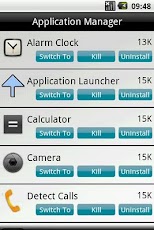
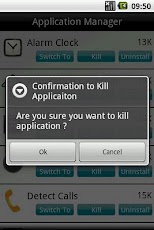
Fade up of waiting for an application to open?? ########################################## Use Droid Application Manager !!!##########################################Droid Application Manager will speed up your phone by allowing ‘YOU’ to stop unwanted background services as well as applications.Moreover, it is fully compatible with the tablets, also.Why Droid Application Manager? ** Speed up you phone ** Save the battery ** Serves as Application Launcher, It allows you to Jump to and from different applications. ** Uninstall unwanted applications ** Stop background services ** Stop background applications ** Automatic sorting by application name, which helps youHow to use?- Launch the Droid Application Manager- It will list all the applications and services which are currently running on your mobile- Every application comes with 3 options – kill : Click on kill button to stop the application / service – switch to : Click on ‘switch to’ to launch the specific application – Uninstall : Use this button to uninstall the application.What are you waiting for? Here is the finest application to decrease your phone load and increase the battery!!! , Yes, It’s Free.
App Screenshots
Other Tools Apps





