
| Price | Free |
|---|---|
| Category | Tools |
| Version | 1.13 |
| Developer | AppEase |
| Added | Apr 16th, 2012 |
| App Views | |
| Votes | 0 votes |
| Google Rating | |
| Ratings | 45 |
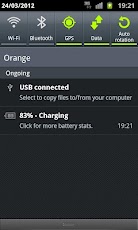
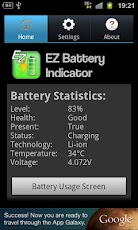
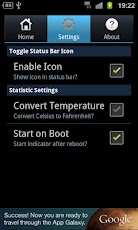
EZ Battery Indicator shows the percentage remaining on your devices battery in a small, yet easy to read status bar icon. Click on the notification to view a full range of battery statistics including and for a quick link to the battery usage screen, the statistics shown include:- Level- Health- Status- Technology- Temperature- VoltageEZ Battery Indicator has settings that are configurable by the user, these include:- Enable/Disable the notification- Converting between Celsius and Fahrenheit for the battery temperature- Enable/Disable the application from starting on reboot.IF you wish to see a new setting or feature implemented, don’t hesitate to email us with your suggestions.Permissions:- RECEIVE BOOT COMPLETED – This is necessary to allow the notification to restart after the device has been rebooted.- ACCESS NETWORK STATE and INTERNET – These are required to display ads.How to Use:1. Configure your preferences in the ‘Settings’ tab.2. Use the Toggle Icon checkbox in the settings menu to enable or disable the status bar icon and notification.3. Start on boot default setting is true, disable this to prevent the battery indicator from starting after rebooting the device.
App Screenshots
Other Tools Apps





