

| Price | Free |
|---|---|
| Category | Communication |
| Version | v0.99 |
| Developer | INFOLIFE LLC |
| Added | Apr 12th, 2012 |
| App Views | |
| Votes | 0 votes |
| Google Rating | |
| Ratings | 273 |
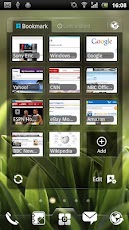
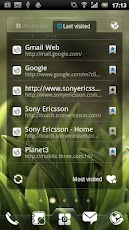
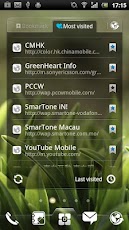
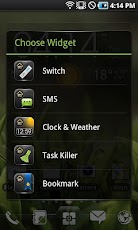
Notice: this widget is only supported by EZ Launcher, please install EZ Launcher first.It features:============Show bookmark and browser history on your home screen.1-click to open bookmark or history on default browser.Support add and edit bookmark.Support check your history order by most/last visitedWhale message Widgets on Android work a bit differently than a normal application. Unlike regular programs they don’t just install themselves in the application tray so you have to add them manually. They will not open or launch.Here’s how to add a widget on your Android home screen.STEPS HOW TO ADD A WIDGET==========================1.On your Android home screen, tap any blank or “empty” area with size 4X4 and hold down your finger. 2.An “Add to Home screen” window will pop up. From that window, tap “EZ Widgets”. 3.You’ll be presented with a list of all the installed Widgets on your Android device. 4.Select the widget to add to your home screen by tapping it.Notes=====Show more message in widget will cost more phone memory.ROM users-> make sure the widget is NOT moved on SD card.Widgets are not supposed to be on SD card. Move it back to the phone storage.
App Screenshots
Other Communication Apps


