
| Price | Free |
|---|---|
| Category | Personalization |
| Version | 1.0.2 |
| Developer | Screenlicious |
| Added | Apr 8th, 2013 |
| App Views | |
| Votes | 0 votes |
| Google Rating | |
| Ratings | 6 |
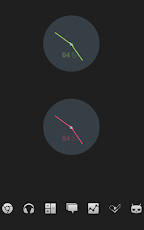
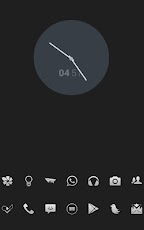
Flatclock is a clock skin for uccw, the name says it all – a flat design. No gradients, shadows, etc. It comes in 10 different colors. Colors of the digital clock and background circle can be adjusted. The latest version of UCCW is needed!INSTRUCTIONS1. Install the skin2. When it’s done installing, DO NO PRESS "Done" just exit the app. Otherwise it won’t show3. Add a new uccw widget to your screen and choose any of the clock styles4. DoneEDIT COLORSYour hotspot mode needs to be OFF for this.1. Tap the widget who’s color you want to modify or hotspot you want to change. 2. You’re inside, modify everything to your liking3. To save, just exit the appQUESTIONS & ANSWERS1. The skin isn’t showing up in the uccw selection menu, what do I do?Please follow the instructions shown above, follow them exactly as written above. 2. How can I change the clock’s color?To change the color, first make sure hotspot mode is turned off, then just tap the widget and you can change its color.Please note: The color of the minute & hour hand cannot be changed.I WOULD ALWAYS APPRECIATE A REVIEW—–clock, skin, uccw, theme, white, black, modify, create, free, design, date, hour, minute, circle, circular, simple, minimal, green, blue, red, yellow, colorful, flat
App Screenshots
Other Personalization Apps


