
| Price | Free |
|---|---|
| Category | Personalization |
| Version | 1.3 |
| Developer | Tipspedia Ro |
| Added | Jul 18th, 2011 |
| App Views | |
| Votes | 0 votes |
| Google Rating | |
| Ratings | 37 |
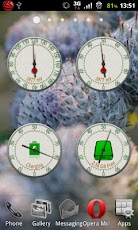
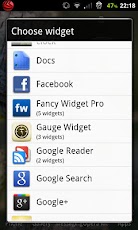
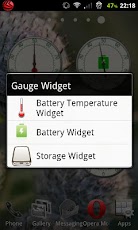
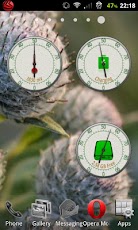
A very cool package of 3 widgets (for now) for your home screen: * battery widget;* battery temperature widget* SD storage widget. Lowest battery consumption possible. Uses highly optimized code in order to conserve the battery life.The widgets have the following sizes: 2×2 and 3×3. If you have android 2.3 installed you can see all the widgets grouped under Gauge Widgets, just like in screenshots. If you have android 2.2 or lower, please search for the following widgets: Battery Widget, Battery Temperature Widget and Storage Widget.The Battery Widget shows the current battery charge percent (the needle) and the status of the battery: charging, discharging or full (the bottom text).The Battery Temperature Widgets show the current battery temperature(the needle) and the voltage(the bottom text).The Storage Widget shows the percentage of used space (the needle) on your SD card and the amount of free space (the bottom text).The starting point (0 for Celsius, 52 for Fahrenheit) also corresponds to the ending point (100 for Celsius pr 232 for Fahrenheit). The difference is made by the color of the center image.The color of the widgets will very depending on the status:* for Battery Widget: it will start with a dark green at 100%, turning lighter until reaching 30%. Starting from this point the color will be red, varying in intensity until 0%.* for Battery Temperature Widget: it will start with a dark green at 0 C or 52 F (52 F is not 0 C, but there where to many numbers on the gauge) until it reaches 45 C or 113 F. Starting from this point the color will be red, varying in intensity until 100 C or 232 F (your phone will be on fire anyway)* for Storage Widget: it will start with dark green at 0% until 75%. Starting from this point the color will be red varying in intensity until it reaches 100%.IMPORTANT: * if you use a task killer, add the GaugeService to ignore list or uninstall the task killer.* this app is a home screen widget; long press on home screen to install; it won’t show up in application launcher screen.If you like the application please rate it. In this way more great features will be implemented.More features will come, so if you miss some feature, please don’t rate it bad, just send me an email and I’ll implement that feature.Future features if the app passes 10000 downloads :):* more widgets* themes/skins (you can see a preview in the last screen shot).
App Screenshots
Other Personalization Apps


