
| Price | Free |
|---|---|
| Category | Tools |
| Version | 0101 |
| Developer | Control Power Home Tech Corp |
| Added | Apr 24th, 2013 |
| App Views | |
| Votes | 0 votes |
| Google Rating | |
| Ratings | 1 |
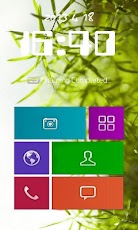
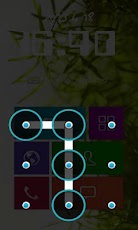
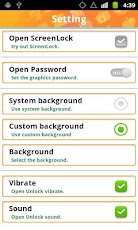
Unlock screen by the gesture password you have set in the background you have chosen. Features:- Lots kinds of background- Specific gesture password- App shortcuts- Base on Android SystemSetting instructions:1) Turn on this app in the main interface2) Open and set your gesture password3) Choose the background between system background and custom background.4) Open the sound and vibrate under themHow to unlock screen though this app?i. Slide the locked screen follow the arrow.ii. Access app by app shortcuts in this pageiii. Enter into the gesture password to unlock or open programs at same timeIn this app, you can choose two kinds of background for the locked screen, system background and custom background. The former uses the cell phone wallpaper as the background for the locked screen; the latter has many pictures for selection.App shortcuts are supported in this screen locker, it contains camera, phone, browser, message and contacts and so on. Click any of them you need to use later and enter into your gesture password to unlock. Or you can just to unlock screen.[******Important******]This free app is ad supported. It may contain some harmless icon ads or notification ads. The ads help us create and maintain these free apps for you. [******Important******]Lock screen is used by many operating systems, this app is used by Android system. It is a user interface element. Lock screens on cell phone provide more functionality beyond unlocking screen, such as a date and time display, or shortcuts to certain applications.
App Screenshots

Other Tools Apps





