

| Price | $0.99 |
|---|---|
| Category | Tools |
| Version | 1.2 |
| Developer | Gary Roth |
| Added | Apr 7th, 2012 |
| App Views | |
| Votes | 0 votes |
| Google Rating | |
| Ratings | 4 |
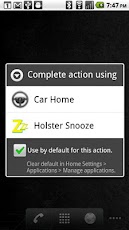
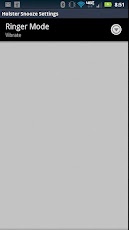
Turns off the screen when you put your phone in a car dock. Also, can switch to alternate ringer mode (e.g., vibrate) at the same time.Why?So you can put a magnet on your holster, fool your phone into thinking it’s in a car dock, and automatically shut off your screen (and change your ringer mode) when you holster your phone.Note: To access ringer mode settings, start Holster Snooze from the launcher (the screen should blank) and then press the menu key.Note: You need to make Holster Snooze your default Car Dock application for this to work. If you change your mind later, this default can be cleared in Home Settings > Applications > Manage applications.Here’s what happened:I ran into a friend a few days ago. He told me how his BlackBerry had died and Verizon replaced it with a Droid 2 Global. Overall, he was happy, but his BlackBerry used to automatically shut off the screen when he holstered it, and his Droid 2 Global didn’t. This resulted in his phone battery charge not lasting all day.I said: I can fix that!The result is this app. Reasoning that other people might want to do the same as my friend, I offer it here in the market.Note: I only had my original Droid to test this app. I assume that this app is likely more hardware dependent than others. Please let me know what your device is and whether it works or not for you.Thanks!
App Screenshots

Other Tools Apps





