

| Price | $1.99 |
|---|---|
| Category | Tools |
| Version | 1.1 |
| Developer | Lipikaar Team |
| Added | Jul 19th, 2013 |
| App Views | |
| Votes | 0 votes |
| Google Rating | |
| Ratings | 0 |
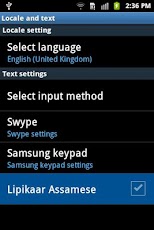
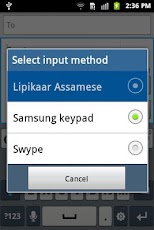
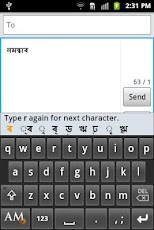
Typing in Assamese on your mobile just got easier! Lipikaar – a smart, easy to use and intuitive typing solution for Assamese. The best part is you don’t need to switch keyboards or remember complicated key positions. Use your regular QWERTY English keyboard, and type any Assamese word effortlessly.How to install Lipikaar Assamese KeyboardStep 1: Go to Settings >> Language and Keyboard >> Enable the Lipikaar Assamese Keyboard.Step 2: Open you desired application, for example, New SMS Message.Keep your finger pressed in the typing area.From the options, select "Input Method".Now select Lipikaar Assamese from the list.The keyboard is now activated and can be used for typing.*Use the EN/AM key on the keyboard to toggle between Assamese and English.********************************************************************************************How to type in Assamese with LipikaarRule 1:Repeatedly type the closest sounding key till you see the correct script character. Type s once for ?, twice for ? and thrice for ?. Also, to attach ? or ? to an alphabet as in ???, ?? type r repeatedly after the alphabet. For ???, type krr, for ??, type krrrRule 2:Type x after the character to get its half-character. For ???????, type nmsxkar ; For ????? type surxy ; For ??????????? type sxbtnxtxrtaRule 3:Type z to add a special symbol of the script. For example ? ? ? ?********************************************************************************************Over 1,00,000 people use Lipikaar to type emails, blogs, and documents in Assamese. Lipikaar products include Windows Typing Software, Firefox Addons and plugins for Websites.Visit us at www.lipikaar.com.
App Screenshots

Other Tools Apps





