
| Price | Free |
|---|---|
| Category | Tools |
| Version | 3.3 |
| Developer | Upper Duper |
| Added | Sep 6th, 2011 |
| App Views | |
| Votes | 0 votes |
| Google Rating | |
| Ratings | 282 |
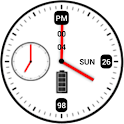
If you are experiencing problems, email to developer directly. We try our best to solve your problems. Instead of getting mad at comments and giving poor rating.It has a good and classic look of analog clock. Plus! It has complete yet useful additional information.Features:1. 2×2 sized widget2. Tap on a widget to enter menu setting3. 2 Theme, Black and White now available4. Digital reading of the clock, both 12H and 24H format5. Date and Day display. Date and day will be in red color on weekends. (Full Version)6. Battery Level display. Blue when battery level is full, orange if in intermediate, and red color when battery in low level. (Full Version)7. Battery charging indicator (Full Version)8. Show Alarm ClockI prepare 2 versions here. Free version and Full version.If you like my widget you can consider to buy me a cup of JAVA coffee to accompany me on sleepless night. (^.^) Haha just kidding…Just please consider to buy Full Version to support development. It would be at reasonable price. And you’ll get more features compared to the free version :)On full version you can have colored Maestro Widget! Date and day will be in red color on weekends and the battery will be colored as well. Blue when battery level is full, orange if in intermediate, and red color when battery in low level. Make your clock widget outstanding!NB : 1. This is a widget not an application. Installation does not give you application. Instead, go to Home Screen and long press to add a Widget.2. If battery level does not appear, just wait for a minute or two.3. In case of Force Close, try to remove then add the widget back to home screen or reboot your device.4. Avoid any task killer that may stop this widget.Enjoy!Tag : clock, widget, analog, digital, battery, alarm, home, maestro
App Screenshots


Other Tools Apps





