

| Price | Free |
|---|---|
| Category | Tools |
| Version | 1.0.3 |
| Developer | PicoLabs, Inc. |
| Added | Apr 3rd, 2012 |
| App Views | |
| Votes | 0 votes |
| Google Rating | |
| Ratings | 4 |
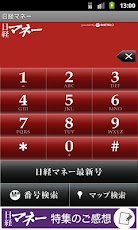
Description Dedicated app for Nikkei Money Magazine. Capable to search by using below functions with Nikkei Money Codes appearing in articles. * Nikkei Money Menu Links to Special articles in Nikkei Money Magazine. **How to use** 1. Tap Nikkei Money Menu button 2. "numeral*numeral" shows on display, jumps directly to a link, and shows a dialogue. Tap "yes" button. 3. Shows page for Special Article(s). *Two-layered numerals for web search Direct access to a web page by entering Nikkei Money Code. **How to use** 1. Input Nikkei Money Code "numeral*numeral" according to the article in the magazine. 2. Tap "M*Search" button. 3. Directs to a link, and shows a dialogue. Tap "yes" button. 3. Web page will appear by using a browser. *Two-layered numerals for map search Direct access to a registered map by entering Nikkei Money Code. **How to use** 1. Input Nikkei Money Code "numeral*numeral" according to the article in the magazine. 2. Tap "Map search" button. 3. Directs to a link, and shows a dialogue. Tap "yes" button. 4. Map application will appear. *Search by formerly used records Enables to re-do above functions by using formerly transacted numerals – limited to registered codes only – **How to use** 1. Tap History button. 2. 50 formerly transacted code-list will appear. 3. Tap the one you need on the list. 4. Code numeral shows on dialogue. 5. Tap "M*Search" button for web search, "Map search" button for searching maps – will not jump to map if not registered. * Multi language support Capable of using Japanese, Korean, Chinese (simplified), Chinese (traditional). Otherwise, English standard. *Trunk Banner By tapping the banner at bottom, registered numeral appears on display which enables functions same as above – maps limited to registered codes only. **How to use** 1. Tap Trunk Banner. 2. Code numeral shows on dialogue. 3. Tap "M*Search" button for web search, "Map Search" button for searching maps – will not jump to map if not registered.
App Screenshots
Other Tools Apps





