

| Price | Free |
|---|---|
| Category | Tools |
| Version | 2.1.3 |
| Developer | Luna Ergonomics Pvt Ltd |
| Added | Mar 28th, 2013 |
| App Views | |
| Votes | 0 votes |
| Google Rating | |
| Ratings | 6 |
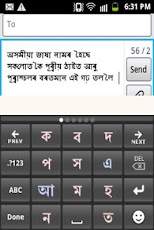
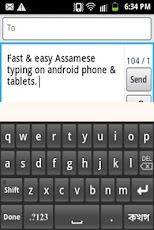
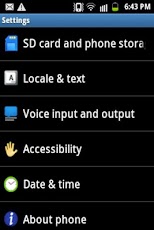
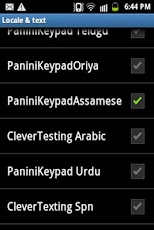
This is a Input Method Editor (IME) and can be used in all applications on your phone by selecting it. Instructions at the bottom.Must watch youtube video (LINK BELOW) to learn how to type lots of difficult words, ja fala, khandatta, all juktakkhar etc etc.http://www.youtube.com/watch?v=F-a-q3inUFsPanini Keypad allows one to type in Assamese and all other Indian languages on the phone with single keypresses (instead of multitaps) very fast and very conveniently by predicting characters that you are most likely to write next. This is a new Predictive text based on linguistics and offers many advantages. Try it!Two rules1. Look for the character, press it.2. If character not there, press Next List button.For Juktakshars (adha ka etc, consonant clusters) please put a ref in the middle of the two consonants. The Juktakshar will automatically form. The Ref is also a character, predicted automatically like others and shown in red for your easy recognition.Examples:????? = ? + ? + ? + ? + ? ????????? = ? + ? + ? + ? + ? + ? + ? + ? + ?Note that was a yuktakshar, so you put a ref in between.???????? = ? + ? + ? + ? + ? + ? + ? + ???????? = ? + ? + ? + ? + ? + ? +?A ja fala is a yuktakshar too.??????? = ? + ? + ? + ? + ? + ? + ? A typical yuktakshar usage.????? = ? + ? + ? + ? + ?????????? = ?+?+?+?+?+?+?+?+? ?????? = ? + ? + ? + ? + ? + ? A ja fala is a yuktakshar too.???????? = ? + ? + ? + ? + ? + ? + ? + ???????? = ? + ? + ? + ? + ? + ? + ???????? = ? + ? + ? + ? + ? + ? + ? Note that the matra (a dependent vowel is always entered after the consonant even though it may be actually occuring before in form). You can input the English in between the Assamese/?????? by switching to ABC mode or you can include English/Assamese Numerals, Symbols and Smilies between the words by pressing the 123 button. In this latest (PaniniKeypad Assamese IME), there is no need to change the input method for writing English/Assamese.Installation.1. Download and install this application on phone.2. Go to "Setting"->"Locale & text"/ Language & input-> Select PaniniKeypad (check on).3. Then select "Input method"/ Default keyboard as PaniniKeypad.4. Back to text compose area, keypad will appear automatically.5. Experience Fast & Easy Assamese typing on phone.
App Screenshots
Other Tools Apps





