

| Price | Free |
|---|---|
| Category | Tools |
| Version | 1.5 |
| Developer | AndroidHD |
| Added | Sep 30th, 2012 |
| App Views | |
| Votes | 0 votes |
| Google Rating | |
| Ratings | 476 |
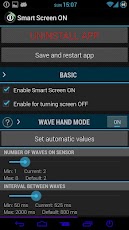
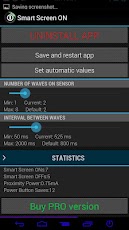
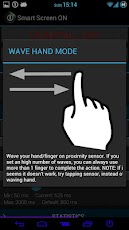
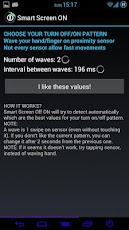
NOTE:This app is designed to work on Galaxy Nexus, please don’t give a negative comment if you test it on another phone!This is LITE version. If you buy PRO version you will find a lot of cool features! For a better compatibility disable the lockscreen.DESCRIPTION:Smart screen ON is an innovative app which turns your proximity sensor into a power button. If you have a big phone with no physical button on the front(Galaxy Nexus for example, you can turn on or turn off the phone just tapping or waving your hand (finger) on proximity sensor.FEATURES:When you change the settings, remember saving and restarting service using built in app specific button.There are two mode available, both mode can coexist:+WAVE MODE: Wave (move) your hand/finger on proximity sensor, even without touching it.You can set the amount of waves you want to use to turn on/off screen and the time between each wave.Do you want to wave your hand quickly or slowly?+TAP AND SWIPE MODE: 1) Tap proximity sensor using your finger;2) Wait for the first vibration;3) Swipe (remove) quickly your finger, before it vibrates for the second time.You can set the time before the first and the second vibration.+DISABLE SENSORYou can also disable sensor after an amount of time you can set in the app panel.The app will disable the whole service and proximity sensor after X time of inactivity.+STATISTICSStatistics include:A)Smart Screen ONs;B)Smart Screen OFFs;C)Total power button saves;D)The power used by your proximity sensor (which is very very low).+START ON BOOTIf you check this, the app will start on boot.+HIDE ICONIf you hide the icon, the app could be instable and could be killed by Android in low memory conditions.+ENABLE FOR TURNING SCREEN OFFThe app has been created to turn screen off, but I also give you the ability to turn screen off.+DISABLE WHEN LANDSCAPEThe sensor will stop working when landscape.+INCOMPATIBILITY-HTC Desire HD is not compatible with "wave mode" because its proximity sensor doesn’t work as it should.If you want to suggest new features, please contact me here: [email protected] or use my site http://www.androidhd.it
App Screenshots
Other Tools Apps





