
| Price | Free |
|---|---|
| Category | Finance |
| Version | 1.3.7 |
| Developer | State Bank of India |
| Added | Jun 12th, 2011 |
| App Views | |
| Votes | 0 votes |
| Google Rating | |
| Ratings | 9853 |
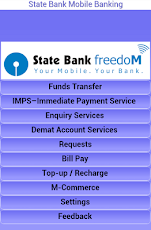
Away from home, balance enquiries can be made and/or money sent to the loved ones or bills can be paid anytime 24×7!!! That is what State Bank FreedoM offers – convenient, simple, secure, anytime and anywhere banking.Registration Process:Step 1: Send SMS MBSREG to 9223440000 to receive User ID and Default MPIN.Step 2: Download State Bank Freedom application from here.Step 3: Change the default MPIN through State Bank FreedoM application.Step 4: Complete registration process instantaneously by visiting State Bank ATM or Branch Option 1: Activate using State Bank ATM-cum-Debit card at any State Bank ATM. Choose ‘Mobile Registration > Mobile Banking Registration > Registration’ Enter your 10 digit mobile number, which should be already registered with the Bank. Option 2: Submit registration form at the Home Branch for immediate activation.Features:* Funds transfer (within SBI or other Bank’s account)* Immediate Mobile Payment Services (IMPS) : Fund Transfer, Merchant Payments 24 x 7 * Enquiry Services (Balance Enquiry / Mini statement)* Cheque Book request* Demat Account Enquiry* Bill Payments (Utility bills, Credit Cards, Insurance premium), Donations, Subscriptions* Mobile Top up* M-Commerce (DTH Recharge of Tatasky, BigTV, SunDirect, DishTV, DigitalTV and Videocon d2h connections, SBI Life insurance premium, etc.)* Booking of train tickets over the IRCTC portal through IMPS
App Screenshots


Other Finance Apps