
| Price | Free |
|---|---|
| Category | Media & Video |
| Version | 1.8 |
| Developer | Noid Software |
| Added | Apr 15th, 2012 |
| App Views | |
| Votes | 0 votes |
| Google Rating | |
| Ratings | 94 |
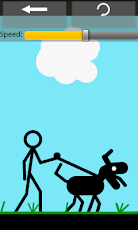
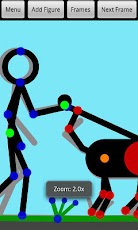
Create stick-figure animations easily. Just put the figure in a pose, press the "Next Frame" button and repeat!Note: Instructions can be found at the bottom of the menu, by clicking the "How to use Stickdroid" button. Please read them first.Note: $1 is not a lot of money. If you can’t afford it, sorry, but it isn’t easy reverse-engineering file formats.Note: Before you give a bad rating because you think you can’t make new figures, please read the instructions under "Modifying a figure". The "Store the figure with a name" button in the menu lets you add figures to the "Add Figure" menu.Limitations of the demo:* Maximum of 25 frames in an animation* Animated GIF exporting is disabled* Full version has option for frame forward/back controls on the main screen* AdvertisementsFeatures include:* Simple interface* Multi-touch and double-tap zooming and panning* Adding several figures to a frame* Modifying, deleting, duplicating and re-organising frames* Making new figures with the Stretch, Copy, Add and Delete tools* Saving and loading animations* Exporting animated GIF files* Importing animations made with Pivot Stickfigure Animator version 2* Changing the colour of the background and individual figures* Storing figures you want to use again* Preset figures to help you get started: Stickman, Alphabet, Swords
App Screenshots
Other Media & Video Apps