
| Price | $2.01 |
|---|---|
| Category | Sports |
| Version | 1.2 |
| Developer | Mark Logan |
| Added | Sep 20th, 2011 |
| App Views | |
| Votes | 0 votes |
| Google Rating | |
| Ratings | 3 |
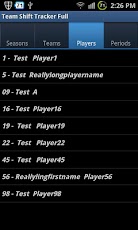
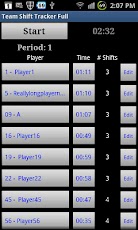
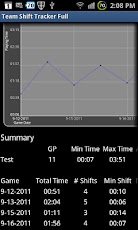
Parents – is your child getting less playing time than everyone else?Coaches – do you have parents on your team continually complaining about playing time?Team Shift Tracker is for you!Use Team Shift Tracker to keep track of playing time for every player on a team. It produces reports per player, per game or for the team as a whole. You’ll be able to see at a glance the playing time for the whole team.Add seasons, teams and players and configure the number and length of periods for your particular sport.When you run a game simply hit the START button to start the timer. Hit the button next to a player when they are playing, hit it again when they are off.Don’t worry if you make a mistake, you can get a list of every shift for a player and edit them if necessary.When the game is over, go into the reports. You’ll be able to see graphs of the playing time for a single player or the whole team. Reports are emailed as a PDF and as CSV so you can import to Excel.I’ve provide reports for:- Single player- Per Game- Team- Whole Season- By Opponent- By Location (Home/Away games)- By Game Type (Regular, Exhibition, Tournament, Playoffs)Need another report? Email me and I’ll do my best to add it.
App Screenshots
Other Sports Apps


