
| Price | $1.45 |
|---|---|
| Category | Personalization |
| Version | 1.2 |
| Developer | BRIONICthemes |
| Added | Nov 21st, 2011 |
| App Views | |
| Votes | 0 votes |
| Google Rating | |
| Ratings | 14 |
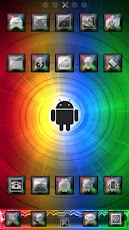
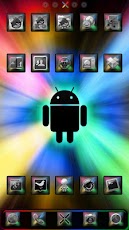
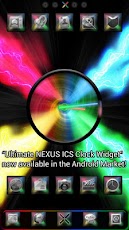
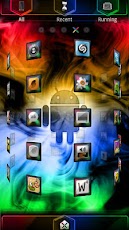
The Ultimate NEXUS Theme is a brand new premium theme for GO Launcher EX.The Ultimate NEXUS Theme is inspired by the bright colors and stylings of the Nexus series of phones.ULTIMATE NEXUS FEATURES:+ THIRTEEN ultra high-resolution ‘Ultimate Nexus’ wallpapers, custom designed with the colors and style seen in the Nexus family.+ Includes a ‘Ultimate Nexus Wallpaper Picker’ for quick and easy wallpaper switching, see instructions below.+ Over 200 beautiful custom designed ‘Ultimate Nexus’ icons, featuring next generation Ice Cream Sandwich main icons. All other icons are themed with matching multi-colored X-style icons. + Totally redesigned app drawer, featuring custom Nexus color scheme, custom tabs, and symbols. Also with THIRTEEN ultra high-resolution ‘Ultimate Nexus’ App Drawer backgrounds.+ EIGHT different dock bars in a variety of styles and colors for more user customization.+ Designed to match "Ultimate NEXUS GO Collection" (includes matching "Ultimate NEXUS GO Contacts EX Theme", "Ultimate NEXUS GO SMS Theme", and "Ultimate NEXUS Clock Widget").DIRECTIONS & INSTRUCTIONSThis is a theme (like a skin) for GO Launcher EX, it will not open on its own. You must install the free home screen app "GO Launcher EX" and apply it.To apply theme:Open GO LAUNCHER EX > Press Menu > Themes > Ultimate NEXUS Theme > ApplyTo change Wallpaper:Press Menu > Wallpaper > Ultimate NEXUS Wallpapers!To change Dock Bar:Press Menu > Pref > Character settings > Backgrounds > Dock Background > GO Theme BGTo change App Drawer background:Press Menu > Pref > Character settings > Backgrounds > App Drawer Background > GO Theme BGTo create icon effects (as seen in screenshots):First, set the scrolling to either horizontal or vertical (this changes which effects are available):Press Menu > Pref > App Drawer settings > Scrolling orientation > Horizontal/VerticalThen, choose an icon effect:Press Menu > Pref > Effects settings > Horizontal scroll effect or Vertical scroll effectTo hide/show the status bar with a swipe:Press Menu > Pref > Operation Settings > Glide up/down action > Show/Hide status barDEVELOPER NOTES:Please e-mail any icon requests. Please e-mail if you have any other suggestions, questions, or concerns.
App Screenshots
Other Personalization Apps


