
| Price | Free |
|---|---|
| Category | Tools |
| Version | 1.0 |
| Developer | SoftwareD |
| Added | Apr 2nd, 2012 |
| App Views | |
| Votes | 0 votes |
| Google Rating | |
| Ratings | 28 |
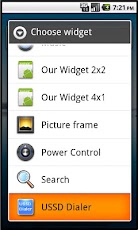
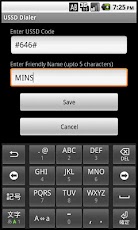
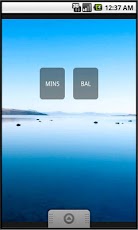
Use the widget to create shortcuts on home screen to dial USSD codes. USSD codes are used to get information from service provider like minutes usage or balance, e.g. dialing #646# or #225#.To create shortcuts follow the steps below (screenshots are provided).1. Add the widget to the home screen. This is done by long pressing on the home screen, selecting ‘Widget’ from the menu provided and selecting ‘USSD Dialer’ from the list of widgets.2. Enter the ‘USSD Code’ on the configuration screen. You can also enter a ‘Friendly Name’. If ‘Friendly Name’ is provided, it shows up on the home screen, otherwise the USSD code is shown by default.3. Click ‘Save’ to place the configured widget on the home screen.Clicking ‘Cancel’ at anytime on the configuration screen does not add the widget to the home screen.Create multiple instances of the widget on the home screen one for each USSD code.Note : The widget supports USSD codes in the format prescribed by Mobile Application Part 1. If USSD codes for your service provider are not supported, please provide feedback.
App Screenshots
Other Tools Apps





