| Price | Free |
|---|---|
| Category | Weather |
| Version | 2.1 |
| Developer | ???????? |
| Added | Apr 2nd, 2012 |
| App Views | |
| Votes | 0 votes |
| Google Rating | |
| Ratings | 98 |
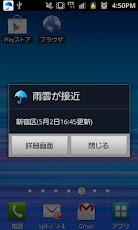
※てなびんverのレイアウトを設定できるようになりました!※通知する時間を指定できるようになりました!『雨降りアラート』は、市町村単位で設定した地域に雨雲が接近したら、ポップアップや通知バーなどで雨の接近をお知らせするアプリです!『雨降りアラート』で、突然の雨を回避しましょう☆また、詳細画面からお天気総合サイト「お天気ナビゲータ」の「雨雲レーダー」、「ピンポイント天気」を確認することができます。※雨雲が観測されない場合は通知しません。※雨が降り続いている場合、初めの通知以降、雨がやむまで通知しません。 ■雨雲接近レベルについて下記3段階で表示します。・雨雲が接近・数時間後に雨の可能性・雨雲は観測されていません ■設定について・地域設定市町村単位で設定できます。・更新間隔「30分、1時間、2時間、3時間、6時間、自動更新なし」から選ぶことができます。・通知する時間(音・バイブ)通知音、バイブ通知をする時間を指定できます。・てなびんてなびんverのレイアウトを設定できます。※「てなびん」は「お天気ナビゲータ」の公式キャラクターです。・通知方法通知バー、ポップアップ、通知音、バイブレーション、LEDのオン・オフを選択することができます。※通知音、バイブレーション、LEDは端末の設定に従います。 ■情報の更新についてメニューの「手動更新」ボタンより、手動でデータを更新することができます。電波状況等が悪い場合、通知されないことがあります。※ I can now set the layout of the bottle, such ver Te!※ It is now possible to specify the time to notice!When rain clouds close to the area that you set in the municipal units, "rain alert" is an application to inform the approach of rain, such as the notification bar and pop-up!In the "rainy alert", let’s avoid the rain suddenly ☆In addition, you can check weather comprehensive site of "weather Navigator", "rain cloud radar" and "pinpoint weather" from the detail screen.※ I do not notice if the rain cloud is not observed.※ When It has been raining, notification since the beginning, you do not notice until the rain stops. ■ About the rain clouds approaching levelThey are displayed in the following three stages., Rain clouds approaching-The possibility of rain a few hours later, Rain clouds are not observed ■ About configuringAnd regional settingI can be set in the municipal units.And update intervalYou can choose "30 minutes, 1 hour, 2 hours, 3 hours, 6 hours, without automatic update" from.And time to notify (Sounds & Alerts)Notification sound, you can specify the time to Vibe notification., Bottles, such TeI can set the layout of the bottle, such Te ver.※ "delivery, such Te" is the official character of "weather Navigator".-Notification methodsYou can select the on-off notification bar, pop-up, notification sound, vibration, of the LED.※ notification sound, vibration, LED will follow the configuration of the terminal. ■ to update the informationYou can from the menu "Manual Update" button, the data to be updated manually.If the radio wave condition is bad, etc., may not be notified.
App Screenshots


Other Weather Apps