
| Price | $2.99 |
|---|---|
| Category | Productivity |
| Version | 1.1 |
| Developer | MRT Research |
| Added | Apr 10th, 2012 |
| App Views | |
| Votes | 0 votes |
| Google Rating | |
| Ratings | 3 |
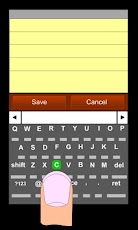
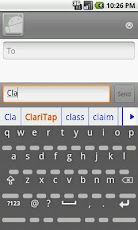
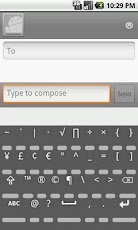
Features- Uninterrupted view of the character you want to enter- Easier, faster and more accurate typing on any touch screen.- One thumb and two thumb typing – Word suggestion- Personal dictionary- Individual punuctuation keys on main keyboardClariTap keyboard makes your cell phone and tablet typing easy, accurate and fast. ClariTap is the solution to big finger and small touch screen keyboard problem.How it works- While looking at the desired character on the keyboard, tap BELOW that character. If you touch on the character itself, it would not respond. Small keys under the characters provide guidance where your finger should tap. Sufficient space is assigned for comfortable tapping. It is OK if your finger goes over the lower charcter or key. – To add a new word to personal dictionary, tap on it in the word suggestion box.- To remove a word from personal dictionary, long press on it in the word suggestion box.- To switch between caps and all caps double tap on shift key.Why ClariTapRegular keyboard is hard to use, prone to error, and slow. In a regular keyboard, the finger hides the desired key and the adjacent keys. Extra focus is required to target the hidden key. There is a high chance of hitting a wrong key, and therefore, typing error. You may verify the key through a pop up feedback and slide the finger to correct the error. But this takes extra effort for every single key and reduces typing speed. Human hand-eye coordination has sufficient capability for hitting the right key even in small cell phone keyboards. The main reason for typing error is the visual interruption of the keys. With ClariTap the finger approaches the correct key without visual interruption and hits the correct key on the first touch. The result is comfortable, accurate, and fast typing. How to enable ClariTap- Go to Settings.- Go to Language and keyboard. – Select ClariTap.- Tap on OK.- Open any application with a text box.- Long press in the text box to open Edit text window. – Select Input method to open Input method options.- Select ClariTap.One hand typing with your thumbYou can even type with one hand using your thumb.Two hand typingYou can also type with two thumbs as in a mechanical keyboard.
App Screenshots
Other Productivity Apps





