
| Price | Free |
|---|---|
| Category | Productivity |
| Version | 1.9.8 |
| Developer | Appventive |
| Added | Aug 11th, 2010 |
| App Views | |
| Votes | 0 votes |
| Google Rating | |
| Ratings | 2532 |
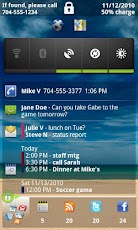
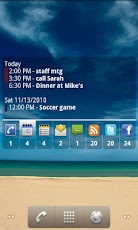
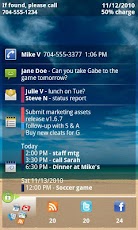
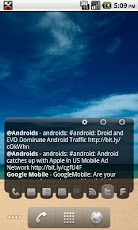
Executive Assistant (EA) provides an all-in-one interface for quickly reviewing your:+ Email: any combination of GMail, Google Apps, or POP/IMAP accounts. Exchange too if you use a supported email client. See below for a list of supported clients. + Text messages: both native and Google Voice, including pop-up and reply options+ Missed calls: return calls directly from the app+ Calendar events (including Exchange & Facebook if supported by your phone)+ Tasks: Astrid, DGT GTD (w/Pure Widget plugin), Google Tasks Organizer, Got To Do, GTasks by Dato, ToDo Task Manager, or TouchDown+ Google Reader+ Twitter timeline+ Facebook newsUse in any of 4 modes:+ Lock Screen: Use as a lock screen replacement to preview all of your stuff without going thru the hassle of unlocking the phone. You choose which info is safe to show on the lock screen.+ Welcome Screen: Instant-on immediately after unlocking the phone.+ Home Screen Widget: ‘always on’ interface wherever you want it. Use a full-widget that includes a preview area, or a single-row, icons-only widget that simply shows the app icons with counts. Many sizes to choose from. Optionally use a Sense-like or Glass theme for the full-widget. + Lock Screen Widget: for Android 4.2 & up you can also put the EA widget on the system lock screen.Full-widgets are scrollable for Android 3.0 & later, and for any launcher that supports version 2 of the scrollable widgets extension, such as: ADW, Launcher+, Go and Zeam. In every mode: launch apps, return missed calls, dial voicemail (or optionally choose to launch Google Voice, Visual Voicemail or any other voicemail app).Reply to SMS messages directly from the Welcome Screen or Lock Screen, without unlocking (if you enable this option).Host your favorite widgets & shortcuts on lock or welcome screen.The background image will be the same as your home screen wallpaper (including live wallpapers). Customize the color and transparency of the text displays in all modes. Optionally select custom icons for the tabs.Integrates with MetaWatch (MWM-CE & MWM-NE)Supported POP/IMAP clients: AquaMail, Enhanced Email, K9 and Kaiten MailYou don
App Screenshots
Other Productivity Apps





