
| Price | Free |
|---|---|
| Category | Productivity |
| Version | 3.0.4 |
| Developer | Seiken-soft Service Co Ltd |
| Added | Dec 7th, 2010 |
| App Views | |
| Votes | 0 votes |
| Google Rating | |
| Ratings | 38 |
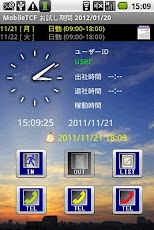
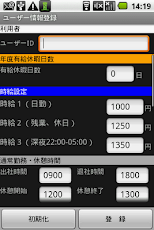
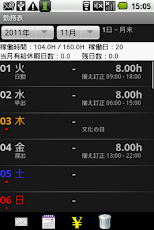
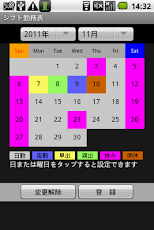
誰でも簡単操作で勤怠管理と電話連絡をサポート!★画面をフリック(横にスライド)すると打刻ボタンが消えてロックされます。★再度フリックするとボタンが表示されます。(フリックロック機能) フリックロック機能で誤打刻を防止します。★タブレットサイズ(3.2~10.1インチ)にも対応しました。★タブレットで大きなボタン・文字表示となり操作もしやすいです。★apkサイズが、Ver.2.2.2の半分以下となりました。★シフト勤務にも対応していますので、業務用でも十分使えます。★背景画像をお気に入りの画像に設定できます。★画面をタッチすれば背景を変更することもできます。★任意の画像格納フォルダーを指定することで、タップする度に背景画像を変更します。お気に入りの写真を登録してあなただけのオリジナル・モバイルタイムカードに仕上げて下さい。毎日の勤務打刻が楽しくなります!!タイムカードの代わりに出社時と退社時ボタンを押すだけで毎月の勤怠管理ができます。ワンタッチダイヤル登録すれば、電話も簡単にかけられます。打刻漏れアラーム機能も付いており、打刻忘れを防止できます。お試し期間は、利用開始から60日となります。タイトルにお試し期間が表示されています。【勤務表】1.選択した年月の1か月分の勤務表を表示します。2.稼働時間/月間稼働時間、稼働日、当月有給休暇日数、残日数を 表示します。3.日付けをタップすると打刻訂正でき、事由の設定ができます。4.日付けを長押しで簡単打刻訂正ができます。5.勤務表をメール送信できます。(CSVファイルを添付送信)6.カレンダ形式によるシフト勤務表で日付けをタップするだけで 日勤・夜勤・早出・遅出・休み・明休の設定ができ、登録ボタンで 登録できます。(勤務表に反映されます。)7.時給計算で、日勤、残業・休日出勤 深夜作業の稼働時間と 時給を計算して表示します。【MENUのユーザー情報登録】1.ユーザーID2.年度有給休暇日数3.時給設定4.通常勤務・休憩時間(最大4個)5.早出・休憩時間(最大2個)6.遅出・休憩時間(最大2個)7.夜勤・休憩時間(最大2個)【MENUの設定画面】1.背景設定2.背景画像フォルダー登録3.アラーム設定4.事業年度開始月、月間開始日5.刻み時間選択6.連絡先、メールアドレス設定7.インポート/エクスポート8.休日設定9.定休日設定Time Management and support phone calls with simple operation for anyone!★ The lock button is stamped disappears flick (next slide) the screen.★ button will appear when you flick again. (Flick lock function)We will prevent accidentally punch flick lock feature.★ I also support tablet size (3.2 to 10.1 in.).★ It is easy to operation and large character display button on the tablet.★ apk size was less than half of Ver.2.2.2.★ We are also compatible with shift work, we are good enough even for business.★ You can set the background image of your favorite images.★ You can also change the background if you touch the screen.★ You can specify a folder to store the image of your choice, every time you tapI want to change the background image. You just have to register your favorite photosPlease finish to the original mobile time card.Be fun stamping work every day! !Simply press the button at the leaving time and attendance time card instead ofYou can manage monthly attendance.If you register one-touch speed dialing, I can easily put phones.We also have a leak alarm function punch, you can prevent a forgotten punch.Trial period is 60 days from the start of use.Trial period is displayed in the title.[Roster]One. Table I shows the work of one month of the selected date.2. Monthly Uptime / uptime, working days, paid vacation days month, the number of days remainingDisplay.3. Punch can be corrected by tapping the date, you can set the reason.4. Can be corrected easily punch press and hold the date.5. You can send e-mail roster. (Sent attached CSV file)6. Simply tap the date on the calendar format shift rosterCan be set only rest Ming Qiu Osode-Yakin early shipment, day shift, at the registration buttonCan be registered. (This is reflected in the roster.)7. Hourly rate calculation, uptime and daytime, late night of work, overtime work on a holidayI calculates and displays the hourly rate.[MENU] registered user informationOne. User ID2. Year paid vacation days3. Hourly rate setting4. Regular working hours, rest (up to 4)5. Break time – early shipment, up to 26. Break time-Osode (up to two)7. Yakin break time (up to two)[MENU] settings screenOne. Background Settings2. Folder background image registration3. Alarm setting4. Fiscal year start month, start date month5. Time step selection6. Contacts, e-mail address set7. Import / Export8. Holiday Settings9. Setting daily.
App Screenshots
Other Productivity Apps





