| Price | Free |
|---|---|
| Category | Education |
| Version | 2.1 |
| Developer | Hal |
| Added | Apr 6th, 2012 |
| App Views | |
| Votes | 0 votes |
| Google Rating | |
| Ratings | 26 |
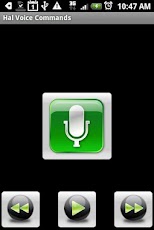
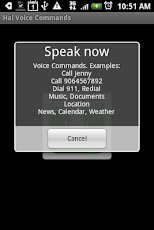
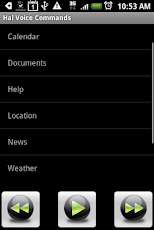
Hal eReader features several capabilities includingvoice recognition/commands, document reader (eReader), voice synthesis, safer driving (beta). It is designed to avoid looking at the phone screen and minimize distractions. This application is voice activated and able to interact with the user by talking. Hal eReader can also save hours of your time and help you become more productive by reading documents and books while you work, exercise, cook, drive, etc. Please remember that Android voice recognition and synthesis are still work in progress. There are many factors to consider. Don’t expect flawless voice recognition and synthesis. Don’t download otherwise. This is a beta version. Your feedback and commentsare appreciated. Download your favorite eBook or school related book and have Hal eReader read it for you.Hal eReader helps you work and study by reading PDF (see PDF section), HTML and .txt documents/books. HTML documents can be read directly from the internet (web) which requires an internet connection. You can also transfer the document (extension .pdf, .htm, .html or .txt) to the device (sd card). To invoke the document reader, select the Reader menu option. Then, select Document or Web. The Document option allows you to select from local documents stored on the device. The Web option will allow you to maintain a list of favorite internet bookmarks. HTML documents need to be properly constructed (paragraph tags, etc.) in order to be read.PDF DocumentsThe document reader application is unable to read all PDF flavors. Especially ‘exotic’ PDF encodings and/or older PDF versions (PDF 1.2 or earlier). PDF 1.4 is recommended. The reader does not support PDF 1.5 Cross-Reference Streams. If the reader is unable to read the document try the following workarounds:a) Try the free Word-PDF conversion tool provided on the Internet: http://www.doc2pdf.net/ (Word/PDF converter)b) Try the built-in conversion features provided by Microsoft Word.c) Try to convert the PDF file to another format: HTML or plain text for instance, by cutting and pasting the document content. To apply (a) and (b), you may first need to convert the PDF file to Microsoft Word.This version of Hal eReader contains links to the following eBooks:a) King James Holy Bibleb) New Heart English Biblec) Moby Dickd) The Origin of Speciese) Relativity: The special and general theoryf) The Art of War – The advanced version also features GPS/location tracking capabilities which allow you to send your current location to family and friends. Because the latest version requires additional permissions, you will need to download a separate application from the market: Hal Virtual Assistanthttp://market.android.com/details?id=Jt.android.app.halAdditional voice commands include:Call JennyCall 9064567892Dial 911RedialDocumentsLocationMusicNewsNews about president ObamaWeatherCalendarPlaylistsSongsWhat time is it ?What is the date ? Note: This version only reads from the external SD Card.Requires Android 1.6+. Android 2.1 is recommended. The talking feature requires google voice search apk and data.Keywords: Virtual Assistant, Media Player, Document/Book Reader (eReader with Voice), Voice Activated, Voice Search, Car, Automobile,Hands free, Talking, Safety.If you like this app, please leave a positive feedback. Send us email before leaving negative comments. We’ll do our best to assist you.
App Screenshots
Other Education Apps