
| Price | Free |
|---|---|
| Category | Weather |
| Version | 1.1 |
| Developer | Antonio C. |
| Added | Aug 31st, 2011 |
| App Views | |
| Votes | 0 votes |
| Google Rating | |
| Ratings | 290 |
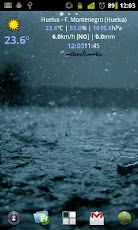
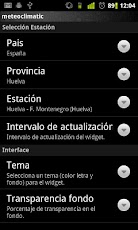
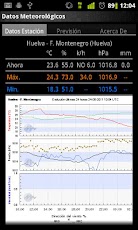
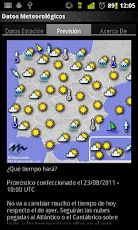
Meteoclimatic es un widget para sistema Android, que permite tener los datos de más de 950 estaciones meteorológicas de la red de Meteoclimatic en el escritorio. SOLO ESPAÑA y PORTUGAL."Meteoclimatic es una gran red de estaciones meteorológicas automáticas no profesionales en tiempo real y un importante directorio de recursos meteorológicos. Si tienes una estación automática y deseas compartir tus datos, te invitamos a participar en Meteoclimatic."http://www.meteoclimatic.comSelecciona la estación que preferas (más de 950 en toda la península) y tendrás los datos meteorológicos en tiempo real.Además, información detallada de los datos de la estación con máximas, mínimas y gráfico de evolución de los datos en las últimas 24 horas.También contarás con previsión del tiempo, para la península, ofrecido por el Departamento de Pronósticos de Meteoclimatic.Pon una estación meteorológica en la palma de tu mano.Para acceder a las diferentes pantallas, pulsa sobre los diferentes elementos del widget:* Icono+temperatura -> Pantalla de configuración.* Nombre+Datos Meteo. -> Datos estación y predicción.* Hora+logo meteoclimatic -> Actualización Manual.Futuras Mejoras**************** Permitir configurar los diferentes parámetros del interface: color, fuente, fondo, …* Posibilidad de configurar alarmas para datos meteorológicos (temperatura, lluvia, humedad, …)* Mayor número de mapas con datos meteorológicos.* Mejoras en el Interface.Agradecimientos***************Gracias a todos los usuarios que han colaborado en la fase de desarrollo, probando la aplicación, detectando errores y sugiriendo mejoras, que hemos tenido en los foros de HTCMania nuestro punto de reunión y gracias a la gente de Meteoclimatic, por su enorme ayuda.Aclaración***********No se contestan preguntas a través de las opiniones de Market. Dudas, sugerencias, …, al correo de la aplicación.Meteoclimatic is a widget for Android, which allows data from more than 950 weather stations Meteoclimatic network to the desktop. SPAIN and PORTUGAL ONLY."Meteoclimatic is a large network of automatic weather stations in real-time non-professional and an important meteorological resource directory. If you have an automatic station and want to share your data, you are invited to participate in Meteoclimatic."http://www.meteoclimatic.comSelect preferas station (over 950 across the peninsula) and have the real-time weather data.In addition, details of the station data with maximum, minimum and evolution graph of the data in the last 24 hours.You also get the weather forecast for the peninsula, offered by the Department of Forecasting Meteoclimatic.Put a weather station in the palm of your hand.To access the different screens, click on the various elements of the widget:* Icon + Temperature -> Display Settings.* Name + Data Meteo. -> Station data and prediction.* Time + logo meteoclimatic -> Manual Update.Future Improvements**************** Allow configure different interface parameters: color, font, background, …* Ability to set alarms for meteorological data (temperature, rainfall, humidity, …)* Increased number of maps with weather data.* Improved Interface.Acknowledgements***************Thanks to all users who have collaborated in the development phase, testing the application, detecting errors and suggesting improvements, we have had in our forums HTCMania venue and thanks to the people of Meteoclimatic, for their tremendous support.Clarification***********No questions are answered through the opinions of Market. Questions, suggestions, …, e application.
App Screenshots
Other Weather Apps