
| Price | Free |
|---|---|
| Category | Productivity |
| Version | 1.6.7 |
| Developer | Ambitico |
| Added | Apr 19th, 2011 |
| App Views | |
| Votes | 0 votes |
| Google Rating | |
| Ratings | 168 |
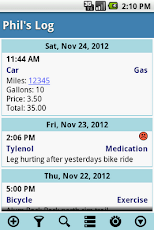
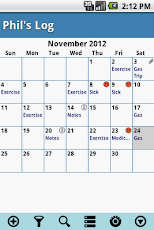
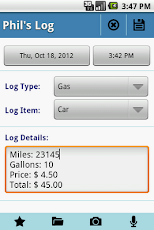
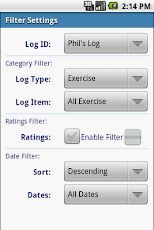
My Logs is an application which functions as a log, journal, or note book. Each log entry is given a time stamp and assigned to a category. Create log categories that are useful for you. Keep track of Exercise, ToDo’s, Medication, Work Activities, etc… * Users Guide: http://www.ambitico.com/docs/MyLogs/mylogs_usersguide.html* No Internet Permissions, your private data is safe with you. Beware of other log apps that can access your log entries without your knowledge.* Categorized Log Entries. Comes with predefined categories to get you going. If you do not see a category that you need, you can rename existing categories, create new ones, or delete those you don’t want to see.* Templates: pre-define log details with text when adding a new log entry* Attach files, photos, or recordings to log entry* Recognizes Web, Phone, and Email text in log description creating clickable links* View log entries in a List or Calendar view* Swipe left/right to switch between List/Calendar view* When in Calendar view, swipe up/down to change month* Rate logs for additional significance* Highly configurable. Create new log categories as well as rename existing* Filter log entries by category, date, and rating* Search logs for specified text. Highlight search text in log description* Use Calendar view to set date filter by long pressing on a date* Save logs as csv or html file with option to email* Preference to treat "," as delimiter in log description when exporting as .csv file. Use commas in the log description to create separate cells in a spread sheet. Good for recording and plotting data entered in the log description.* Backup and restore database (NOTE: It is highly recommended that you regularly backup your logs and save to a different storage media)* Automatic backup of database to SD card* Uses the phones system time (12 or 24 hr) and date format to ensure consistent time and date format between apps. (Note: You can override the system date and time settings from MyLogs preference settings)IMPORTANT: If you have questions or issues, please contact us via email ([email protected]). Do not post questions in the market as we are unable to respond.NOTE: A number of users have given 1 star related to log categories. My Logs comes with predefined log categories to get you going. There is no limit to what you can log. If you do not see a category that fits your needs, you can rename existing categories or create new ones. Please see Users Guide: http://www.ambitico.com/docs/MyLogs/mylogs_usersguide.htmlReponse to user comments:——-Daniel Jul 17 & Maria Jul 3, 2012Log categories are configurable. If you do not see a category, you can either create a new one or rename an existing category. To add a log entry press "Add Log Entry", select your category, add log details, then press "Add" ——-Jill July 1, 2012Restore only works if you have done a backup of your logs——-too on May 28, 2012Log categories are configurable. If you do not see a category, you can either create a new one or rename an existing category.——-Susan on March 29, 2012You choices are not limited. Log categories are configurable.Key: app, log, logging, logger, data logger, diary, note, memo, journal, secure, notepad, free.
App Screenshots
Other Productivity Apps





