
| Price | Free |
|---|---|
| Category | Productivity |
| Version | 11.0 |
| Developer | sgh |
| Added | Oct 12th, 2012 |
| App Views | |
| Votes | 0 votes |
| Google Rating | |
| Ratings | 2 |
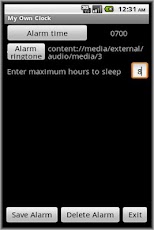
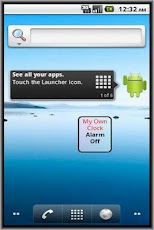
For people who have this strange habit of sleeping too many hours will make you sleepy affecting your life next day.This app is unique as in besides setting the alarm time, you will also set the maximum hours to sleep. So every night, before sleeping, you will tap on the app widget to let the alarm re-calculate when should the alarm rings. The app alarm will not be scheduled beyond the alarm time you have set.E.g You set alarm time at 0700 and maximum sleep hours as 8. If you tap widget at 2300 the night before you sleep, the app alarm will ring at 0700. If you tap the widget at 2200 the night before you sleep, the app alarm will ring at 0600 instead as you set the maximum sleep hour to 8. If you tap the widget at 2330 the night before you sleep, the app alarm will STILL ring at 0700 instead despite you set the maximum sleep hour to 8.Within main app, set your own alarm time, maximum hours to sleep and then tap Save Alarm. To get the widget on home screen, long tap on Home screen -> Widgets -> My Own Clock. Important points to note: – The alarm time will only be scheduled when you tap the widget. This is needed for the app to re-calculate the alarm time based on the time you sleep by tapping the widget.The application support English, Simplified Chinese, Traditional Chinese display.
App Screenshots
Other Productivity Apps





