
| Price | Free |
|---|---|
| Category | Productivity |
| Version | 1.1 |
| Developer | Greg Barrett |
| Added | Apr 3rd, 2012 |
| App Views | |
| Votes | 0 votes |
| Google Rating | |
| Ratings | 42 |
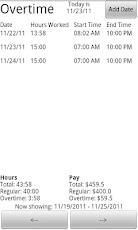
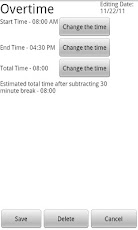
This application allows you to keep track of the hours you work. After entering your hours for each day, you can track:Total hours workedRegular hours workedOvertime hours workedTotal payRegular PayOvertime PayNOTE: When you start using this app, hit the ‘menu’ physical key to access settings. This will let you set up your pay period and other options. If you don’t see overtime hours appearing the way you expect, please go through the settings to ensure they match you pay system (the defaults might not).You can customize the following settings:NEW: Overtime on per day or per pay period basisPay period start datePay period length (one or two weeks)Pay RateOvertime MultiplierOff-the-clock time, for example a 30 minute lunch breakTo use the application:Select the "Add Date" button to add a new work day.Click and existing workday to edit it.Hit the physical "Menu" button on your phone and select "Settings" to configure options such as pay periods.If you were a user of the Overtime Beta application, your data from that application will not carry over into this release version.Feel free to contact me via email with any questions or feedback you may have about the application. Thank you to everyone who has contacted me with feedback and otherwise enjoyed this application. It has recently hit 500 downloads, and I have received dozens of emails about it. To everyone who suggested additional features that didn’t make it into this release, be patient, I’m hoping to do another update again soon.Enjoy!
App Screenshots
Other Productivity Apps





