
| Price | Free |
|---|---|
| Category | Productivity |
| Version | 1.0.7 |
| Developer | AppSubstance |
| Added | Apr 11th, 2012 |
| App Views | |
| Votes | 0 votes |
| Google Rating | |
| Ratings | 4 |
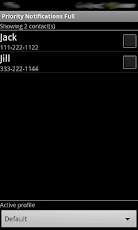
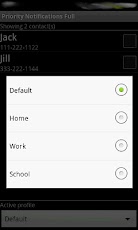
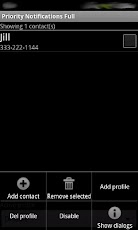
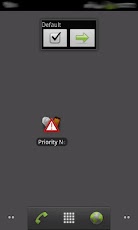
Priority Notifications helps you with important calls and messages.Simply select a contact from the contact list to create a priority contact. Any calls or messages coming from priority contacts will generate a priority notification even if your phone is set to be silent.★★ Now full and 100% free (no ads)Notification by keywordsBe notified of text messages that have specific keywords.Just go to "Menu -> More -> Notification keywords" and add as may keywords as you want.For example, add the keyword "report" to be notified of any message containing "weekly report". You can add as many keywords as you want, including whole phrases. If the phrase "annual report" is added, you’ll be notified if you receive the message "annual report ready", but no notification will be played for the message "weekly report".When a message containing a keyword you added is received, the default notification ringtone will be played quickly twice, in sequence.Note that priority contacts still have precedence over keywords. If the message received is from a priority contact, the normal notification rules for priority contacts will be applied (see below).Create different profiles* for different situations and use the home screen widget to conveniently switch profiles and enable/disable priority notifications. Note that only contacts in the active profile will be considered. If the calling contact is not a priority contact, Priority Notifications will not do anything.When you receive a call from a priority contact and your phone is set to silent/vibrate:• The global default ringtone will be played (contact specific ringtones are not considered) one time until completion, or the call is accepted or canceled;• The phone will vibrate (device must support vibration);When you receive a message (SMS/MMS) from a priority contact and your phone is set to silent/vibrate:• The global default notification sound will be played (contact specific notification sounds are not considered);• The phone will vibrate (device must support vibration);Also:• If the phone is not in silent mode and the call is from a priority contact, you’ll hear the ringtone as you would normally plus a short notification sound;• If the phone is not in silent mode you receive an SMS/MMS message from a priority contact, you’ll hear the normal notification sound twice;Since the goal is to have in your priority contact list only contacts that are really important, the App allows a maximum of 10 contacts* per profile.You can create a profile for each situation: if you are in a meeting but waiting for an important call, at home or even on vacation.
App Screenshots
Other Productivity Apps





