

| Price | Free |
|---|---|
| Category | Productivity |
| Version | 1.0 |
| Developer | Tom Reece |
| Added | Apr 7th, 2012 |
| App Views | |
| Votes | 0 votes |
| Google Rating | |
| Ratings | 6 |
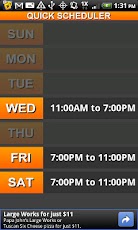
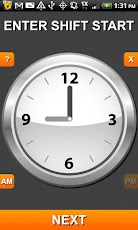
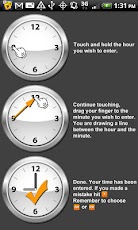
Quick Scheduler makes it quick and easy to enter your weekly work schedule by using a new and unique method for time entry on mobile devices: you simply touch and hold the hour then drag your finger to the minute. So 9:00 can be entered by putting your finger down on 9, dragging to 12, and releasing your finger. To enter 12:00 you would simply touch and release on 12 on the clock.Once you get the hang of it, any time can be quickly entered by drawing a single line between two numbers instead of the numerous tapping involved in entering input with current time entry methods built into mobile devices and other scheduling apps (like scroll wheels or + – menus).Quick Scheduler is NOT a full feature scheduling app. There is not multiple events per day, multiple calendars, labeling of events, repeating events, etc.I set out to make a fast and minimal one week schedule view, not a complex multi-event calendar. Speed of entry and appearance were my focus. That’s why Quick Scheduler is quick and pretty.New features coming soon include:- Different color themes- Sync with Google calendar
App Screenshots
Other Productivity Apps





