

| Price | Free |
|---|---|
| Category | Productivity |
| Version | 4,0 |
| Developer | dbworks Inc. Android Technologies |
| Added | Nov 14th, 2011 |
| App Views | |
| Votes | 0 votes |
| Google Rating | |
| Ratings | 1 |
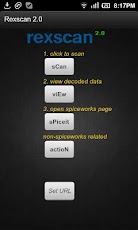
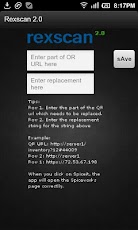
This application scans the QR-Code generated by the Spicewoks (QR plug-in – A plugin by Tabrez)This will help overcome the "Web page not available" error when trying to open the spiceworks page that you decode.* Requirements:Barcode Scanner – by Zing ( Free App, download from App Market)How to use Rexscan – for Spiceworks:1. You will need a working Spiceworks Server.2. A barcode generated using the QR plug-in (stuck on the inventory item such as a desktop, router etc.)3. Now simply scan the barcode using this app. Click on ‘View’ to see the result. Check to see if the ‘Action’ button opens the correct Spicework page. If not then you will need to identify the hostname and replace it with the correct IP address. See the next line.4. After identifying the replacement string, you can save it by clicking on Set URL. This will save it permanently on the phone. You can always modify it later.How is this app useful?* If your spiceworks is on the internet, you can replace the local hostname with the public IP in order to open the spiceworks page on your mobile phone outside the network.* If you want to replace the hostname on the QR URL with the local IP address in order to open the spiceworks page on your mobile phone.
App Screenshots
Other Productivity Apps





