

| Price | Free |
|---|---|
| Category | Productivity |
| Version | 1.6 |
| Developer | cybacchus |
| Added | Apr 24th, 2012 |
| App Views | |
| Votes | 0 votes |
| Google Rating | |
| Ratings | 9 |
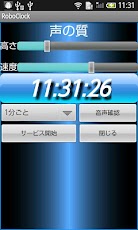
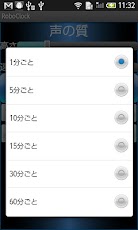
* If the audio does not appear, please read the following precautions.* I support SD card installed.Minute intervals you specifySince the time I speak (English)I do not even bother to look at the clockYou can check the time.For example, if 12:13as tweleve thirteen.Even while listening to music or radioIt does not get in the way.Adjust the height and speed of the voice,Please adjust the sound to yourself heard easily.While I was looking for something simple for myself because I wantedI made I did not.Use originally,One. Ready to go out without looking at the clock at high volume by applying first thing in the morning.2. Even last-minute commute, always know the time while listening to music.(You can adjust the stride with confidence)Is!In similar software, here is only better yan yeahIf there is something more, Please introduce me.Also, if there is a different sizes, and you tell me, you might add more useful features.- I’m sorry, but I ad luck.(At the time of installation, allowing the connection of the net is out for that.)[How to use]I selected, the interval at which one utterance..Adjust the height of the two voices., The speed, the test utterance with voice confirmationI will adjust the sound heard easily.In the button "Start Service" 3., 読上 to start the service.(Read the time in the interval, even away from the app, set)4 If you want to end., Start the app againI press the button "End of Service".Notes ****No hidden sound I would not get you reported. .Although I was confirmed, by the terminalThere seems to be the case from the beginning, an audio file is not turned on.In that case, the terminalInstall voice data Settings> Speech> Text input> Voice SettingsDo you want to install the voice data fromPlease run the installation application data directly from the following URL.https://play.google.com/store/apps/details?id=com.svox.langpack.installer&feature=search_result #? t = W251bGwsMSwxLDEsImNvbS5zdm94LmxhbmdwYWNrLmluc3RhbGxlciJdSorry to trouble you, but thank you.Future renovation plans ****· Timer functionAutomation and installation of soft speech synthesis· Utterance by shakingI’ll add a little bit if you can request and so on.Failure, etc., We would appreciate it if you would e-mail if possible.
App Screenshots
Other Productivity Apps





