

| Price | Free |
|---|---|
| Category | Productivity |
| Version | 1.4.0 |
| Developer | KING JIM CO., LTD. |
| Added | Apr 7th, 2012 |
| App Views | |
| Votes | 0 votes |
| Google Rating | |
| Ratings | 660 |
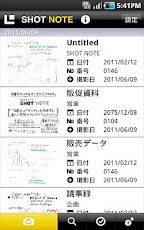
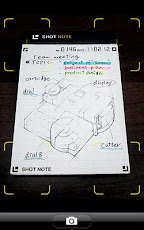
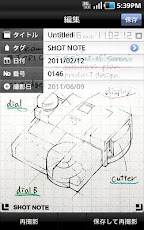
SHOT NOTE is a new notebook you can digitize and organize handwritten notes.SHOT NOTE is needed to use this application.Get yours at your nearest KING JIM retailer or at Amazon.com.Write > Shoot > Organize >Share Handwritten Notes!Digitally store and organize handwritten notes easily.?The models already confirmed you can use SHOT NOTE [ NTT docomo ]ARROWS X LTE (F-05D?2.3)MEDIAS PP (N-01D?2.3)MEDIAS WP (N-06C?2.3)ELUGA power (P-07D?4.0)GALAXY Tab 10.1 LTE (SC-01D?3.2)GALAXY S? (SC-02C?2.3)GALAXY S? LTE (SC-03D?2.3)GALAXY Note (SC-05D?2.3)GALAXY Note ? (SC-02E?4.1)GALAXY S? (SC-06D?4.0)AQUOS PHONE (SH-01D?2.3)XPERIA (SO-01B?2.1)XPERIA arc (SO-01C?2.3)GALAXY S (SC-02B?2.2 2.3)XPERIA acro (SO-02C?2.3)XPERIA acro HD (SO-03D?2.3)XPERIA GX (SO-04D?4.0)[au]INFOBAR (A01/2.3)[ Function details ]1.Shoot the page with your Android phoneAfter opening the SHOT NOTE App, just take a picture with your camera, and the page will automatically adjust tofit perfectly on your screen.2. The OCR function makes notes easy to findBy making use of the OCR function, dates and numbers can be added to notes making them easy to find and organize.3. Shoot and ShareSend notes via e-mail or upload them to Evernote to access them anytime.?Notes can post to Evernote / Dropbox / GoogleDrive / Twitter?Rich sort function ?Tag import from Evernote?Tags can be added automatically?Multiple selection function to export or delete at the same time?11 stages of brightness adjustment?Color / two stages switch function"Evernote" is a trademark or a registered trademark of Evernote Corporation."Dropbox" is a trademark or a registered trademark of Dropbox, Inc."Twitter" is a trademark or a registered trademark of Twitter,Inc.
App Screenshots
Other Productivity Apps





