
| Price | Free |
|---|---|
| Category | Productivity |
| Version | 1.6.1 |
| Developer | Custom Solutions |
| Added | Apr 6th, 2012 |
| App Views | |
| Votes | 0 votes |
| Google Rating | |
| Ratings | 70 |
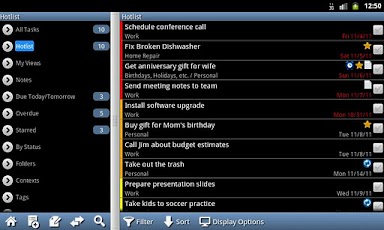
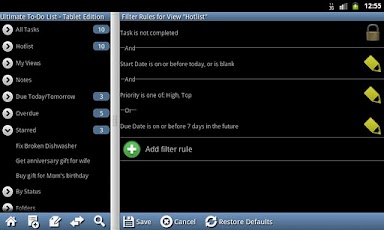
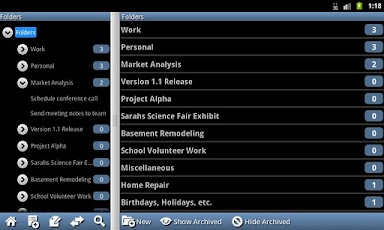
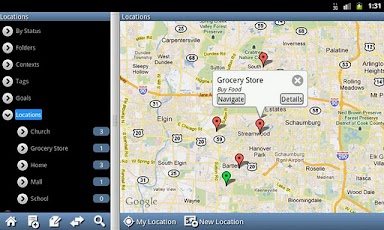
A to-do list and notebook for power users – designed for tablets – which syncs with Toodledo and Google Tasks / gTasks.This is a 14 day free trial. After the trial, a license may be purchased for $5.ORGANIZE:- Re-sizable split-screen view, designed for tablet devices such as the Galaxy Tab and the Motorola Xoom.- Organize tasks by folder, location, context, tags, goal, star, and subtasks.- Supports complex repeating patterns (for example: every Tuesday and Thursday).- Track both estimated and actual length of tasks. Includes a built-in timer.- Organize your notes into folders.- Link your tasks with contacts on your device. Allows you to quickly call, e-mail, or navigate to someone right from your to-do list.- 2 home screen widgets: a task list (in multiple sizes), and a new task buttonSYNCHRONIZE:- Synchronizes with Toodledo.com and Google Tasks / gTasks, allowing access from both your desktop computer and handset. Supports all features supported by Toodledo and Google.- Supports multiple accounts.- Automatic synchronization, including instant upload of changes on your tablet to Toodledo and Google.- Supports subtasks without a paid Toodledo Pro account. (Subtask syncing requires a Toodledo Pro or Google account.)PRIORITIZE:- Includes 5 priority levels and a task status field (active, planning, waiting, etc.).- Option to set a time based and/or location based reminder (proximity alert) for a task. When linking a task with a location, a location alarm will occur when you reach that location.- Optional nagging alarms remind you again if you don’t hear the sound or feel the vibration.- Custom vibrate patterns, sounds, and light colors allow you to distinguish a task alarm from other alarms.- Snooze alarms until later if you can’t do the task right away.CUSTOMIZE:- Filter and search on any task field.- Sort by up to 3 levels, on any task field.- Configurable display allows you to see the exact information you are interested in.- Save your filter, sort, and display options into custom views for quick access later.- Customizable interface: Turn off the features you don’t want to keep things simple.- Choice of light or dark theme.
App Screenshots
Other Productivity Apps





